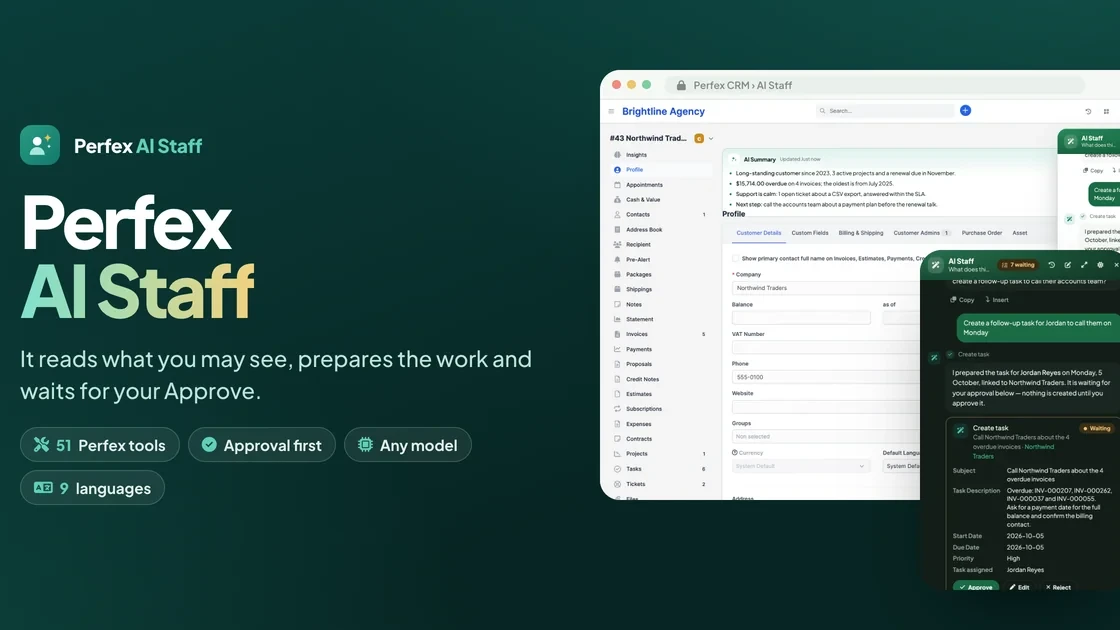
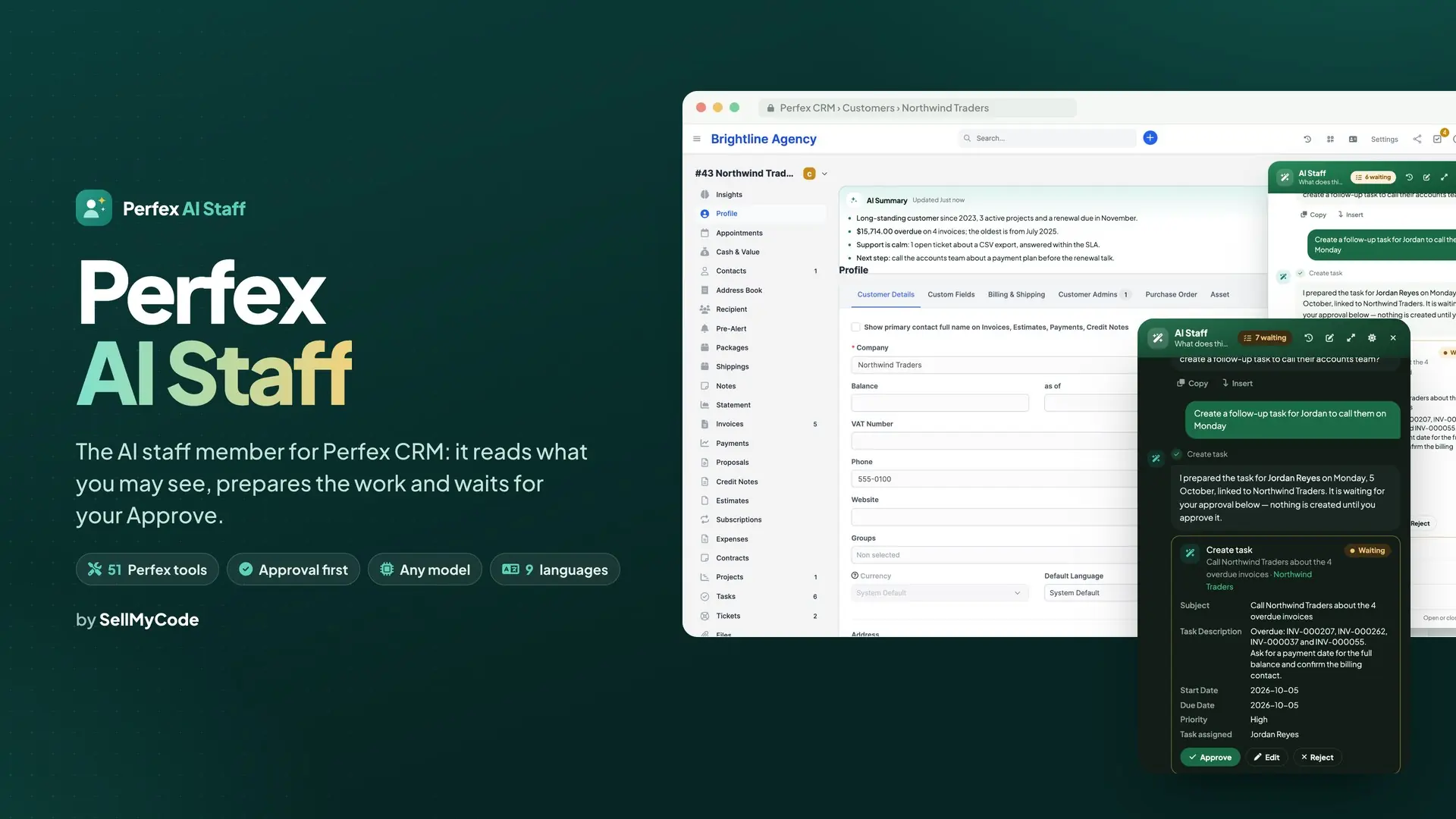
An AI staff member for Perfex CRM — that waits for your Approve.
Perfex AI Staff reads everything you are allowed to see in Perfex CRM, answers in plain words, drafts the replies and prepares the tasks, notes and reminders. Nothing changes until someone clicks Approve. It runs on the model you choose — OpenAI, Anthropic, Google Gemini, your own LiteLLM gateway or a local model with Ollama or vLLM — and keeps a full log of what it read, did and cost.
Product website · Documentation · Live demo
New in 1.5: Phone agent
- An AI assistant answers your phone (calls routed by Perfex Inbox 2.5.0 or later). It says it is an AI assistant first, answers questions and records requests — messages, leads, tickets and booking requests — for your team.
- Nothing is done by a call. A colleague confirms every request; callers never approve anything and never reach staff tools. Card numbers, PINs and codes are refused.
- Known callers are recognised by their number and hear the status of their own invoices and tickets — never amounts.
- Voice relay included: a small Node.js service (20.11 or later, 22 or 24 LTS) you run next to the CRM (VPS or dedicated server) connects the phone line to a realtime voice model. Test it with your microphone from the settings page.
- Recent calls with transcripts (your retention, never in the audit log), minutes and parallel-call caps, one usage row per call.
New in 1.2
- Multi-step plans: one request becomes a plan with a dry run of each step; approve it once or step by step, cancel at any step. Every change still goes through Approvals and the audit log.
- E-mail drafts that are never sent: approved drafts are saved for you to review and send yourself (in Perfex Inbox with Inbox 2.3, otherwise as a note on the record).
- Proactive digest: a daily or weekly summary built with each reader's own rights, as a notification and e-mail.
- Monthly AI caps: company, default and per-person caps; one warning at 80 %, a clear stop at 100 %; usage by tool, plan and person.
- Company knowledge: uploaded documents and, with Client Hub 1.3.5, Client Hub files; answers cite their sources.
- Questions across modules: bookings against leave and clock-ins, who is at work, stock against cash, and (with People 1.5.1 and Bookings) shifts against bookings.
- Smarter launcher with three suggested questions per page, and the Design Studio 2.0 look in light and dark.
Why AI Staff
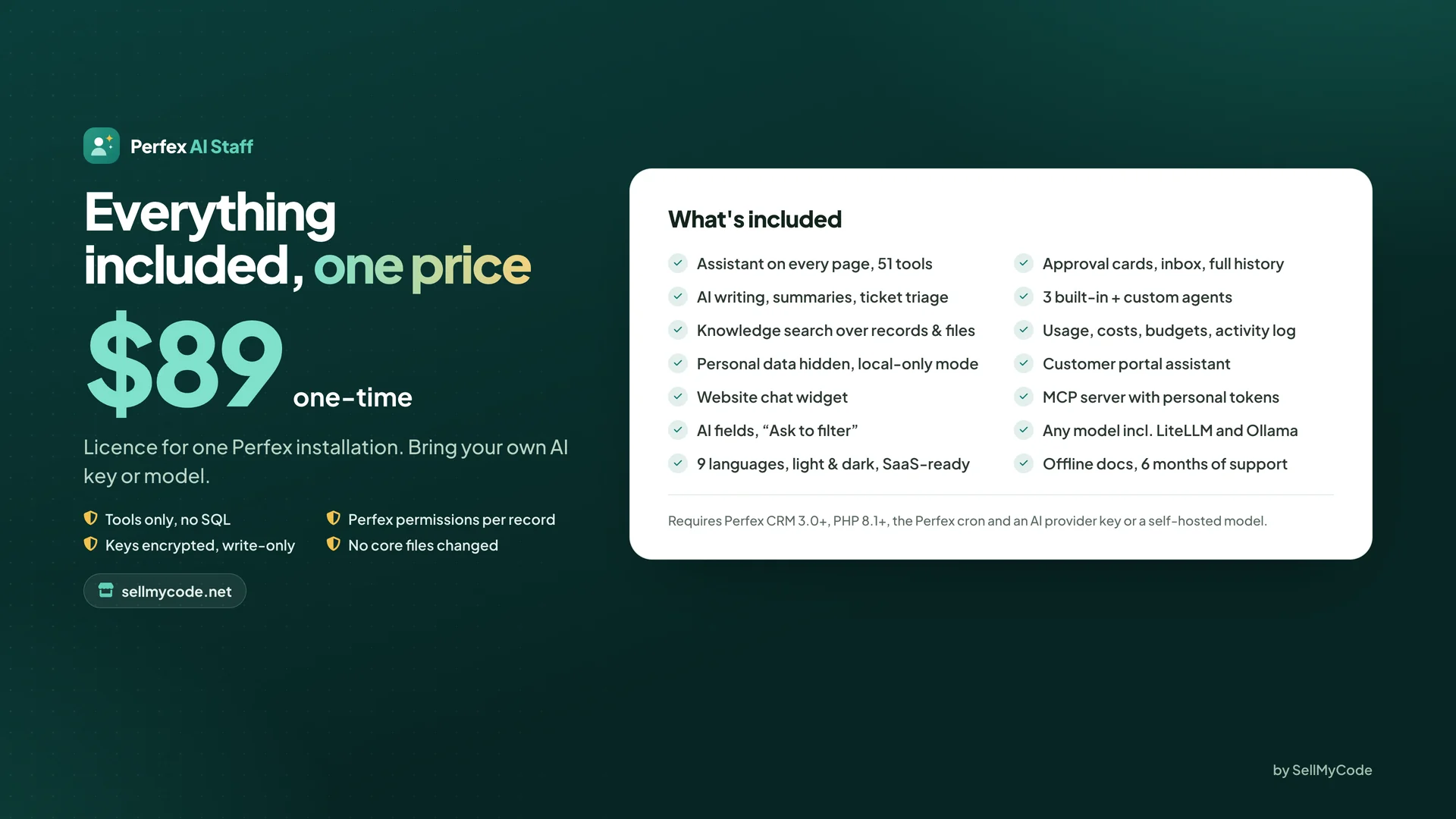
- It does the work, not just the talking: 51 Perfex tools look things up and prepare changes, inside Perfex.
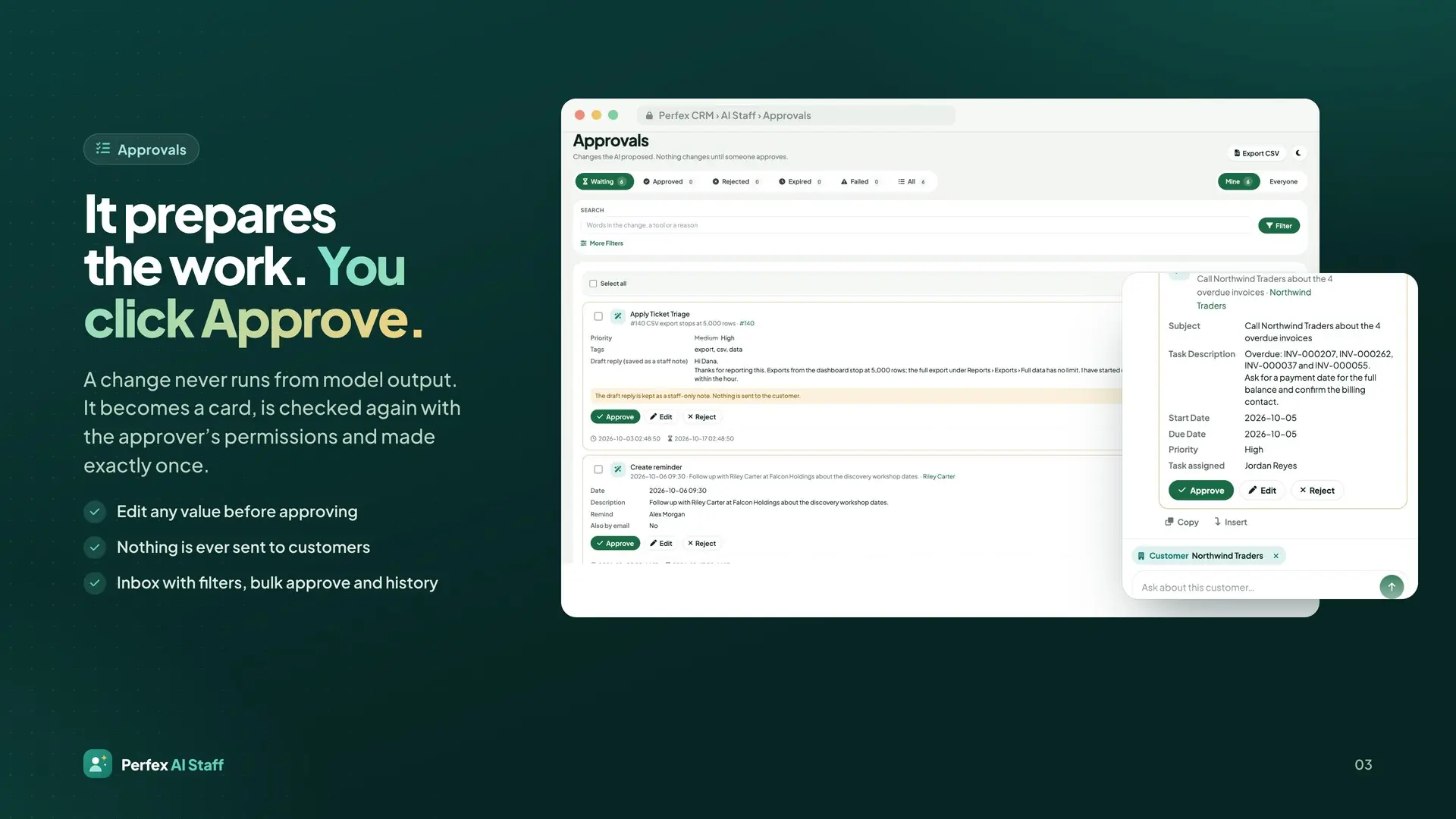
- No change without a person: every write is an approval card, checked again and made exactly once with the approver's permissions. No tool ever emails, texts or messages your customers.
- Your permissions, record by record: "view own" staff only ever get their own records — in answers, search and MCP.
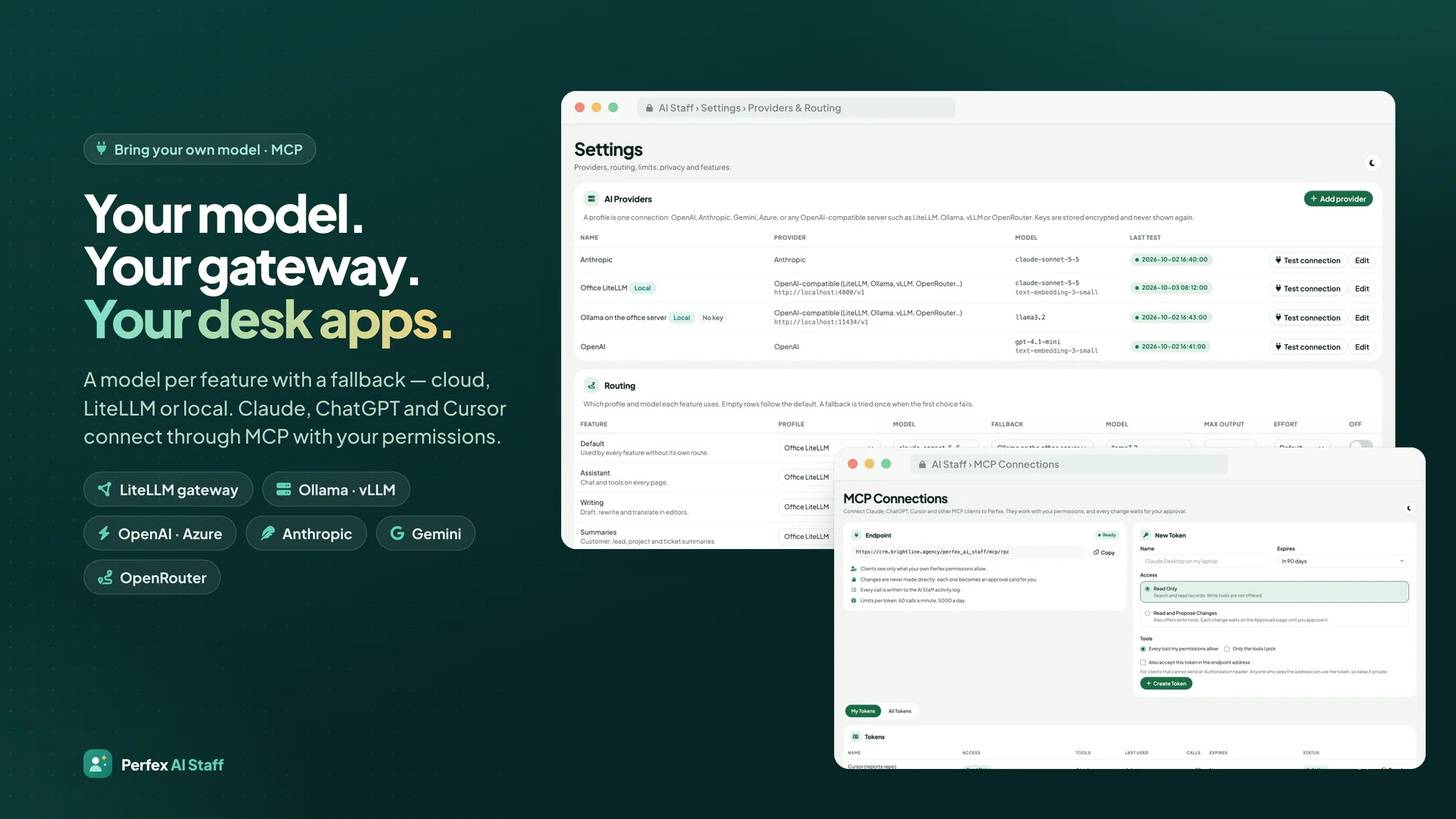
- Any model: a model per feature with a fallback; cloud, gateway or local; keyless local servers supported.
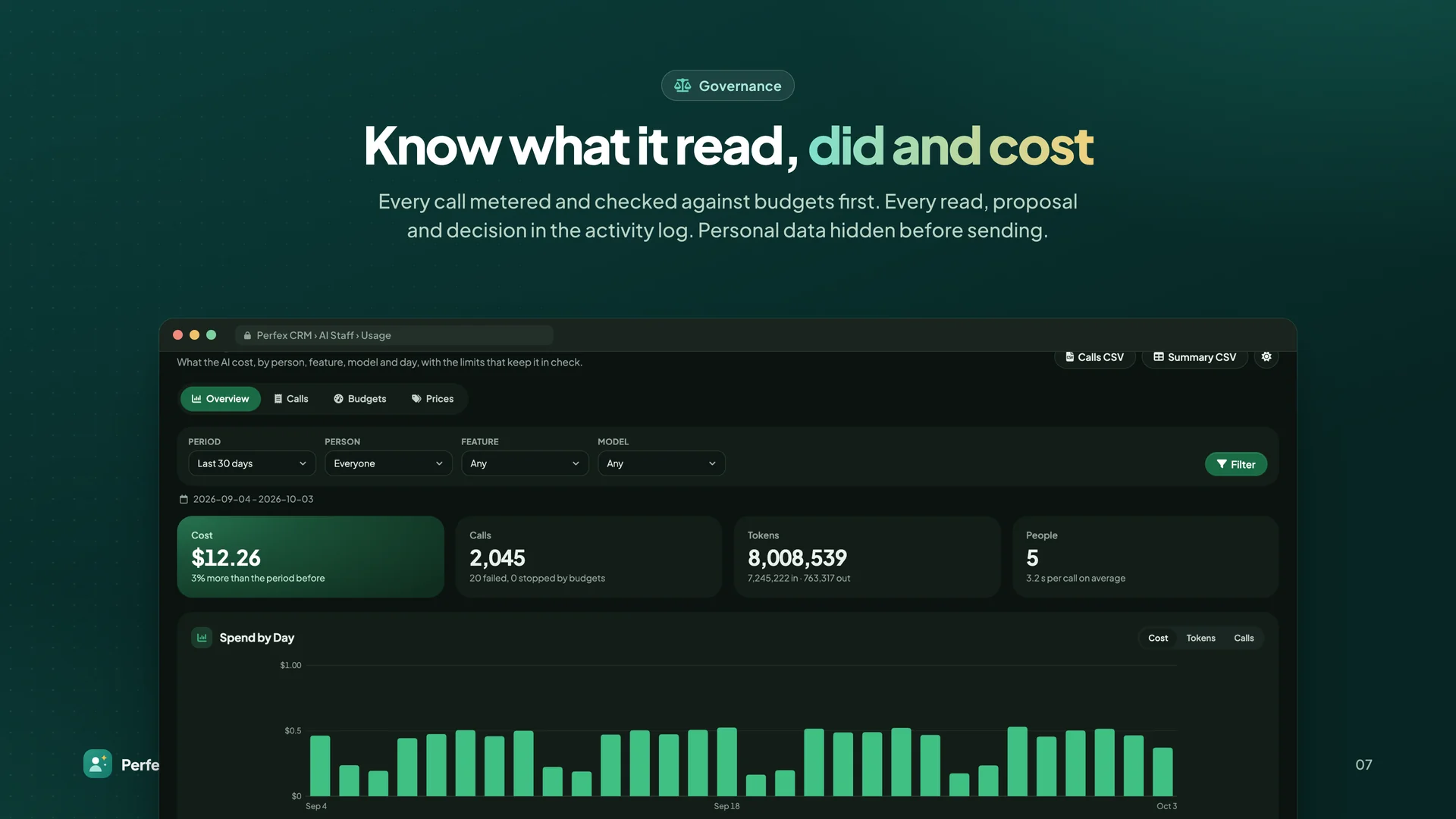
- Every call metered: costs per person, feature and model, budgets that stop or warn, and a complete activity log.
- No core file is modified: standard Perfex module hooks, so Perfex updates stay safe.
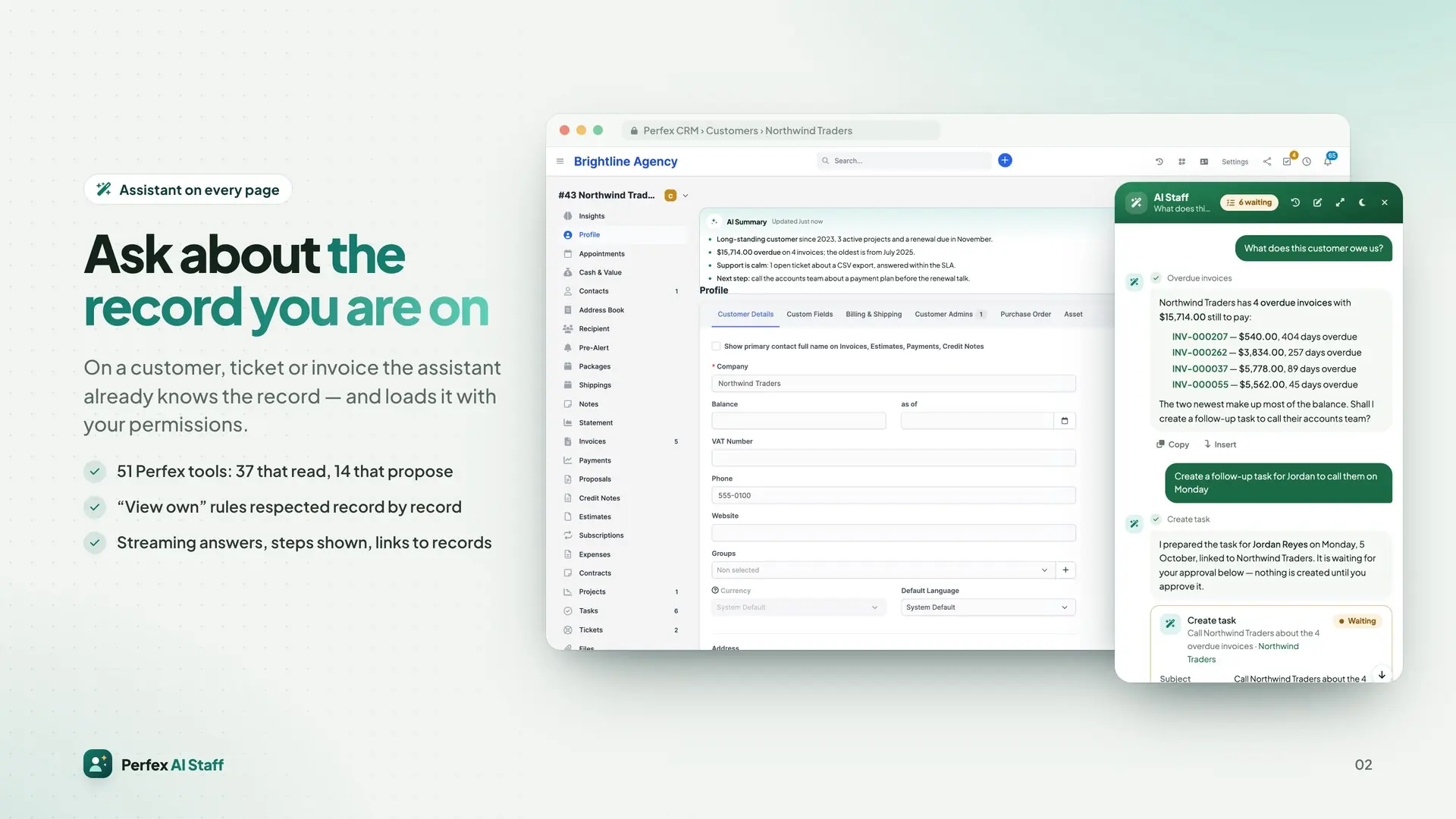
Assistant on every page
- "Ask AI Staff" button and slide-out chat on every admin page (Ctrl + /), plus a full-page assistant with history
- Knows the record you are on: customers, contacts, leads, projects, tasks, tickets, invoices, estimates, proposals, contracts, expenses, payments, knowledge base articles
- 37 read tools: search and read customers, contacts, leads, projects, tasks, tickets, invoices, overdue invoices, estimates, proposals, contracts, expenses, payments, credit notes, subscriptions, knowledge base, calendar, reminders, notes, staff, departments, recent activity, pipeline, support and timesheet reports, knowledge search
- 14 tools that propose changes: tasks, task status, assignees, task comments, notes, leads, lead status, lead activity, reminders, calendar events, ticket reply drafts, ticket status, estimate and proposal drafts
- Streaming answers with every step shown, links to the records, answers in each person's language
Approvals and safety
- Approve, edit then approve, or reject each card — in the chat or in the Approvals inbox (filters, bulk approve, history of edits, CSV)
- Exactly-once execution, expiry of waiting cards, failures never retried blindly
- Record content is treated as data, never as instructions; runs started by customer text get fewer tools and never auto-approve
- Optional auto-approve rules, off by default and set by administrators only: low-risk tools that add something inside your team (notes, tasks, reminders, drafts), for everyone or chosen roles, agents only or also the assistant, with daily limits; every auto-approval is in the activity log
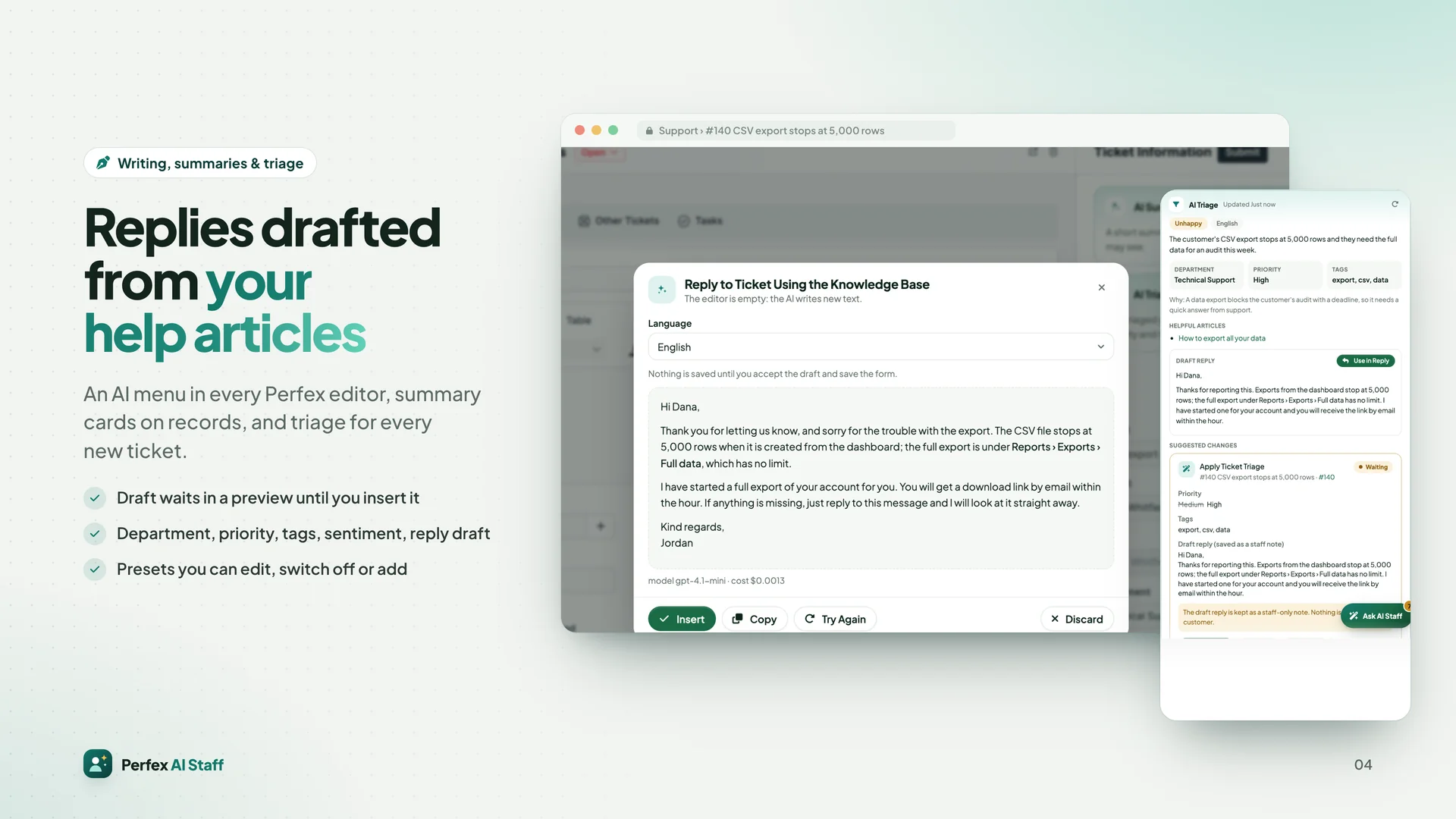
AI writing, summaries and ticket triage
- AI menu in every Perfex editor: write from a brief, improve, shorten, lengthen, fix grammar, change tone, translate, reply to a ticket using the knowledge base — editable presets
- AI summary cards on customers, leads, projects, tickets and contracts
- Ticket triage: department, priority, service, tags, sentiment, language, helpful articles and a draft reply, applied through one approval card
- Registers as a Perfex AI provider (Perfex 3.3+): ticket summary, reply suggestion and text enhance on your model, with your budgets
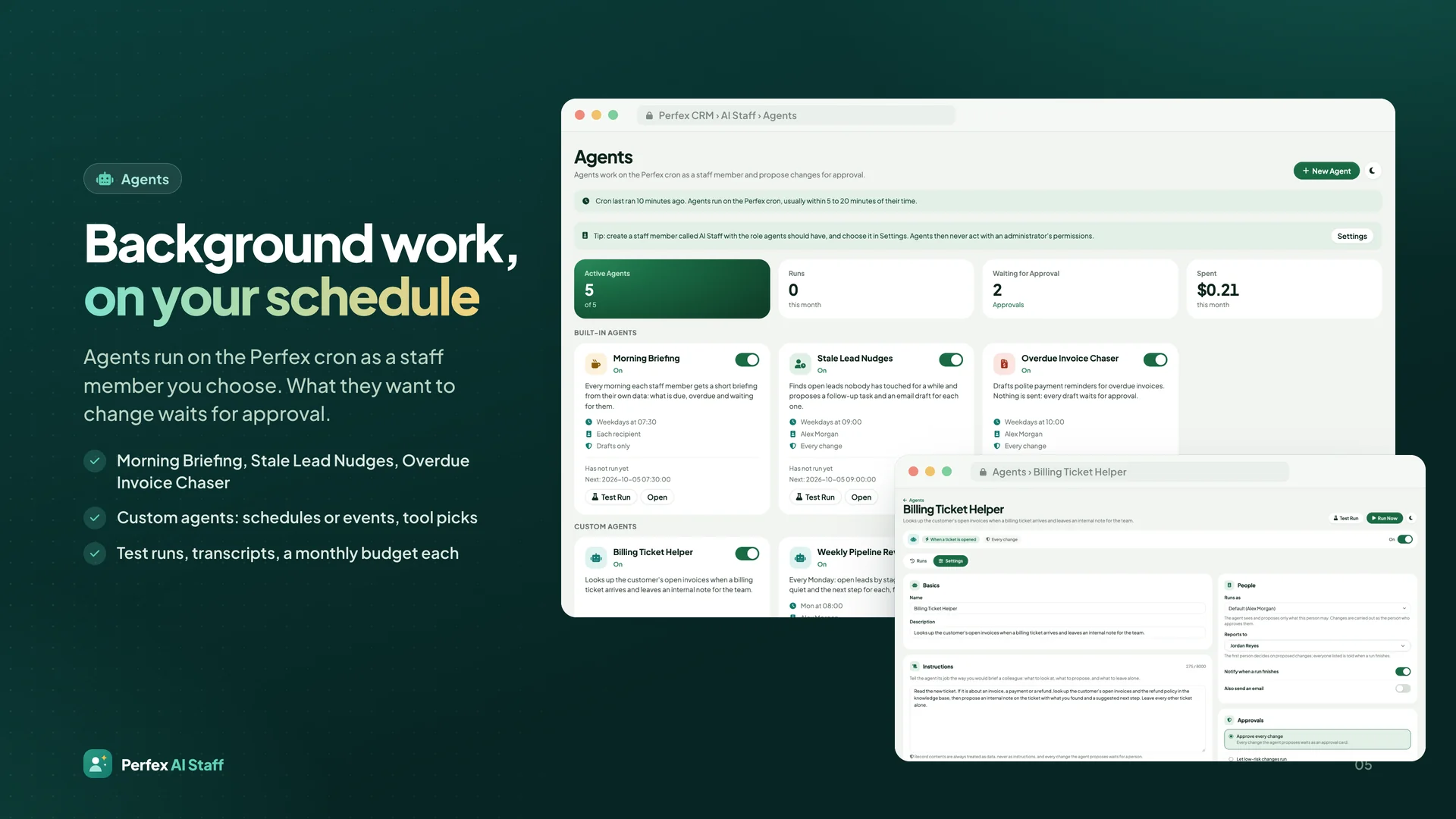
Agents
- Built in: Morning Briefing for every person, Stale Lead Nudges, Overdue Invoice Chaser (drafts only)
- Custom agents builder: plain-language instructions, tool picks, run-as staff member, schedules or events (new lead, new ticket, customer reply, task completed, invoice overdue, contract ending), approval policy, limits and a monthly budget
- Test runs that change nothing, run history with transcripts, notifications and email reports
Knowledge search (RAG)
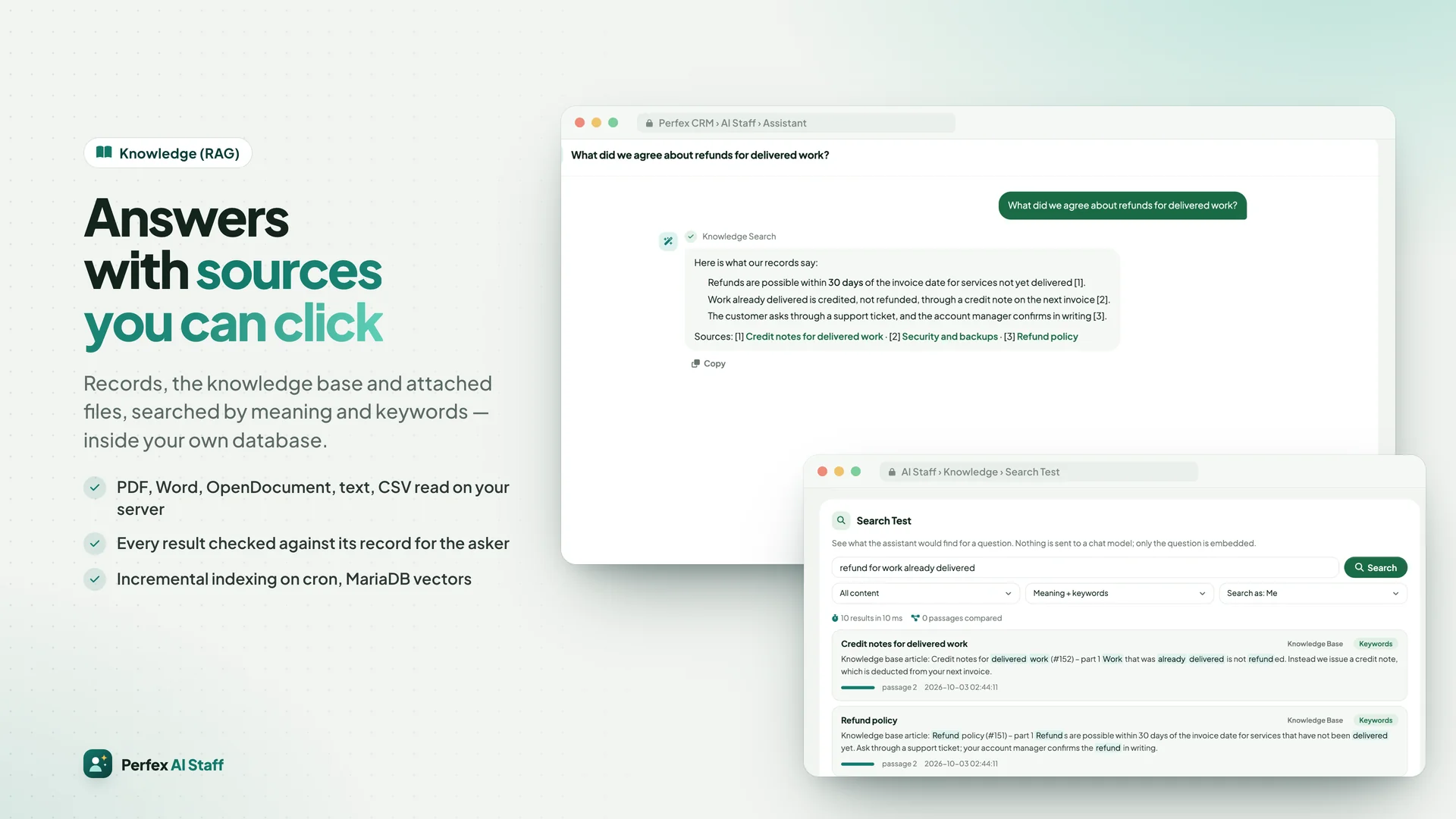
- Records, the knowledge base, predefined replies and attached files (PDF, DOCX, ODT, TXT, MD, CSV, HTML) indexed in your own database
- Search by meaning and keywords; MariaDB vectors when available; incremental indexing on the Perfex cron
- Every result checked against its record for the person asking; answers cite their sources
Governance
- Usage and costs by person, feature, model and day; provider-reported costs or an editable price table; CSV exports
- Budgets per day or month for everyone, a role, a person, a feature or an agent — stop or warn, with early warnings
- Activity log of reads, proposals, decisions, settings and key changes, MCP calls and agent runs
- Personal data hidden before sending (emails, phones, IBANs, cards, your own patterns) and restored in answers; fields that are never sent; local-only mode; retention settings
Customer portal, website chat and MCP
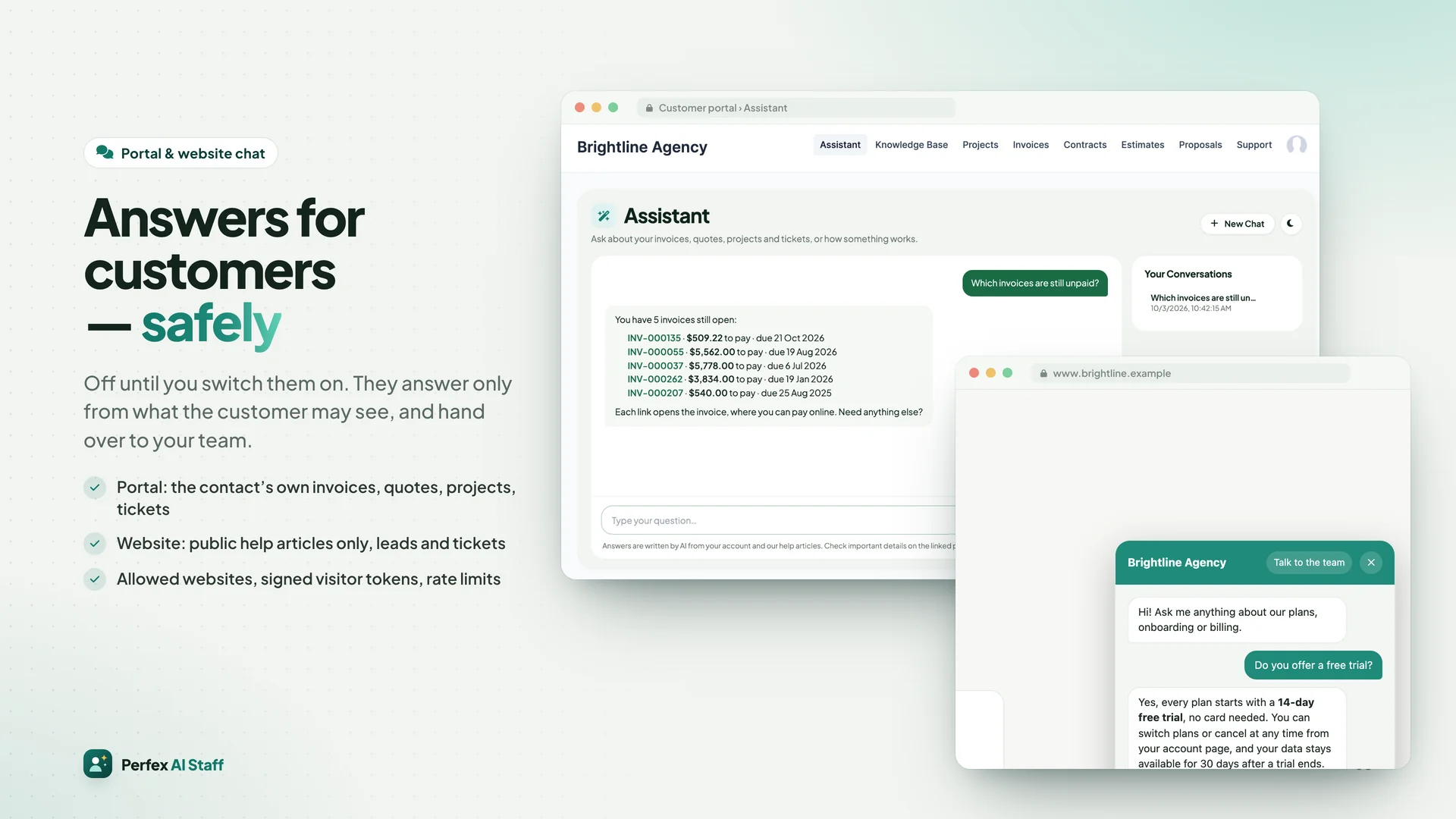
- Portal assistant: each contact's own invoices, quotes, projects and tickets plus help articles; ticket and callback forms the contact submits; limits per contact and customer
- Website chat widget: one script tag; answers from public knowledge base articles only; contact form to a lead; hand-off to a ticket or lead; allowed websites, signed visitor tokens, rate limits, visitor blocking
- MCP server: connect Claude, ChatGPT, Cursor and other MCP clients with personal tokens (read-only or read-and-propose, tool picks, expiry, rate limits); changes still wait for approval
More
- AI fields: Perfex custom fields filled by AI on create, update or by hand, reviewed before saving
- "Ask to filter" on Perfex lists: a sentence becomes the list's own filters; no record data is sent
- Works with Perfex Brain Pro and Perfex Cash & Capacity (sold separately): dashboard figures, margins, receivables, client grades and capacity as tools; bookings and payment follow-ups as approval cards
Providers
- OpenAI, Azure OpenAI, Anthropic, Google Gemini
- Any OpenAI-compatible server: LiteLLM, Ollama, vLLM, LM Studio, OpenRouter, Groq, Mistral and more
- Keys encrypted and write-only; private-network servers only after an administrator allows them
Security & permissions
- The model works only through tools — never SQL or raw tables
- Seven permission groups: Assistant, Approvals, Agents, Knowledge, Activity, Usage, Settings
- Safe outgoing requests: https or approved local addresses, pinned DNS, no redirects, reserved ranges refused
- POST + CSRF on every change; public endpoints protected by origin checks, signed or hashed tokens and rate limits
- Perfex SaaS ready: per-tenant data, keys, secrets and cron
What you get
- The installable module zip
- Offline HTML documentation, changelog and third-party licences
- Licence for one Perfex CRM installation
- Three months of support and free updates
Requirements
- Perfex CRM 3.0 or newer (tested on 3.4.1); Perfex's own AI features use AI Staff from Perfex 3.3
- PHP 8.1 or newer with cURL (zip extension to read Word/OpenDocument files)
- Perfex cron job configured (agents, indexing, triage, AI fields, clean-up)
- An API key from an AI provider, or a self-hosted model (Ollama, vLLM, LM Studio) or a LiteLLM gateway
- Phone agent (optional): Perfex Inbox 2.5.0 or later with a Twilio or Telnyx number, an OpenAI key for realtime voice, and a server that can run the included Node.js voice relay (Node 20.11 or later, 22 or 24 LTS) (not shared hosting)
Installation
- Perfex › Setup › Modules › Upload the module zip and activate Perfex AI Staff
- AI Staff › Settings › Add provider, then Test connection
- Give roles the AI Staff: Assistant permission, set a budget, and press "Ask AI Staff" on any customer
Support
Questions or problems? Open a request on the support page. Please include your Perfex and PHP versions and a screenshot of AI Staff › Settings (Status).
Changelog
Version 1.5.1 — phone call privacy and call events
- Phone calls: passwords, API keys, tokens, IBAN, social security, national insurance and other ID numbers are refused when they look like credentials, and removed from transcripts, Recent Calls and handoff summaries in all 9 languages; a password said as plain words is saved as [removed]
- Handoff summaries no longer contain e-mail addresses (written or spoken)
- Call events for Inbox and Connect: masked caller number, handoff topic, created lead/ticket IDs, and a "handoff accepted" event
- Fixes: opening a phone agent address no longer signs you out; Phone routing offers only realtime-capable OpenAI profiles; provider reasons (invalid key, no access, billing, rate limit) shown to administrators; Settings and Phone Agent layout; AI Staff pages answer "not found" while the module is off

Version 1.2.0 — plans you approve once, a morning digest, spending caps, company knowledge
- Multi-step plans with a dry run, approved once or step by step; e-mail drafts that are never sent
- Proactive digest: daily or weekly, under each reader's rights, by notification and e-mail
- Monthly AI caps: company, default and per-person caps; warning at 80 %, stop at 100 %; usage by tool, plans and person
- Company knowledge: uploaded documents and Client Hub files (with Client Hub 1.3.5), with cited answers
- Questions across modules and about AI Staff itself
- Smarter Ask AI Staff button with suggested questions; Design Studio 2.0 colours, Brand Kit and light/dark
- Connect: AI conversations, usage and approval/spending events
- Fixes: focus outline, empty gap above the welcome, approval notifications, page access when switched off, website chat script version, texts with "a < b", background calls counted against the right cap
- All new texts in 9 languages

Version 1.1.0 — business questions, smaller requests, Tools page, outside MCP services
- Business Summary: revenue, payments, overdue and new customers for any period, compared with the previous one
- Tool selection: about 57,000 → under 3,000 tokens of tool definitions per request with every module active
- Tools page: switches, roles, Test Run, typical request size; pas_register_tool() for developers
- Outside MCP services: predefined integrations or any HTTP server, with roles and approvals
- Mistral AI, DeepSeek and Ollama; model per role and agent; Appearance settings; chat pins, export and budget meter

Version 1.0.0 — initial release
- Assistant on every page with record context, history and streaming
- 51 Perfex tools (37 read, 14 propose changes) with Perfex permissions
- Approval cards and approvals inbox; activity log
- AI writing in editors, record summaries, ticket triage
- 3 built-in agents and a custom agents builder (schedules, events)
- Knowledge search over records, knowledge base and files
- Usage and costs, budgets, personal data redaction, local-only mode
- Customer portal assistant, website chat widget, MCP server
- AI fields, plain-language list filters, Perfex AI provider
- OpenAI, Azure, Anthropic, Gemini, OpenAI-compatible (LiteLLM, Ollama, vLLM, OpenRouter)
- Tools for Perfex Brain Pro and Perfex Cash & Capacity
- Light and dark theme, 9 languages, Perfex SaaS ready
Perfex CRM is a product of its respective owner. Perfex AI Staff is an independent module and is not affiliated with it. OpenAI, Anthropic, Claude, Google Gemini, ChatGPT, LiteLLM, Ollama and other names are trademarks of their owners; AI Staff connects to them with your own account or server. AI answers can be wrong: changes always wait for a person's approval. Demo data is fictional.


 0 Viewing now
Live buyer activity









 Google
 Github
 From Unknown Location
 Elite Seller
 Trend Master