2.2.8 - 2026-11-20 — Search without accents, upload-folder note on every page
Data and hosting
- Improved: the note about upload folders after a move now shows at the top of every admin page, not only the dashboard.
- Improved: a small site missing one picture next to an old copy is no longer treated as moved; when a few pictures are missing in
  place, Utilities › Activity Log names the folder that still has them (the folder notes after a move are written there too).
- Fixed: a server clock set back no longer pauses the folder check.
Search
- Improved: every search box in Design Studio, the command palette, the sign-in language picker, the client portal and your website
  lists ignores accents ("cafe" finds "Café"), and waits for Japanese, Chinese or Korean input to be committed before it filters.
Updates
- Upload the files and run Perfex's Upgrade Database for the module: no manual step, every design, page and setting is kept
2.2.7 - 2026-11-20 — Calmer notes after a server move
Data and hosting
- Improved: the note about upload folders after a move appears on its own (no Design Studio page has to be opened first), no longer
  shows on a site that never moved but is missing a picture or two, and tells you to bring the pictures together in one folder.
- Improved: while the upload folder is not clear, Design Studio looks at the folders again only when they change, not on every page.
Premium Gallery
- Fixed: searching "classic" finds the Classic templates in every language.
Updates
- Upload the files and run Perfex's Upgrade Database for the module: no manual step, every design, page and setting is kept
2.2.6 - 2026-11-20 — Moves between servers, smoother premium installs
Data and hosting
- Fixed: a backup restored on another domain, server or database (hosting move, staging copy, Backup & Migration "new domain")
  keeps finding its Design Studio uploads and theme files: the storage folder name is kept in the settings instead of being
  derived from the host, and theme style addresses follow the site address. An install that already moved finds its folder again
  after the update; when more than one upload folder could be the site's, nothing is guessed and administrators see a note naming
  the folders until one is clear.
Premium Gallery
- Fixed: installing a Client Portal template no longer reports a missing website look (portal templates have none; the step is
  skipped).
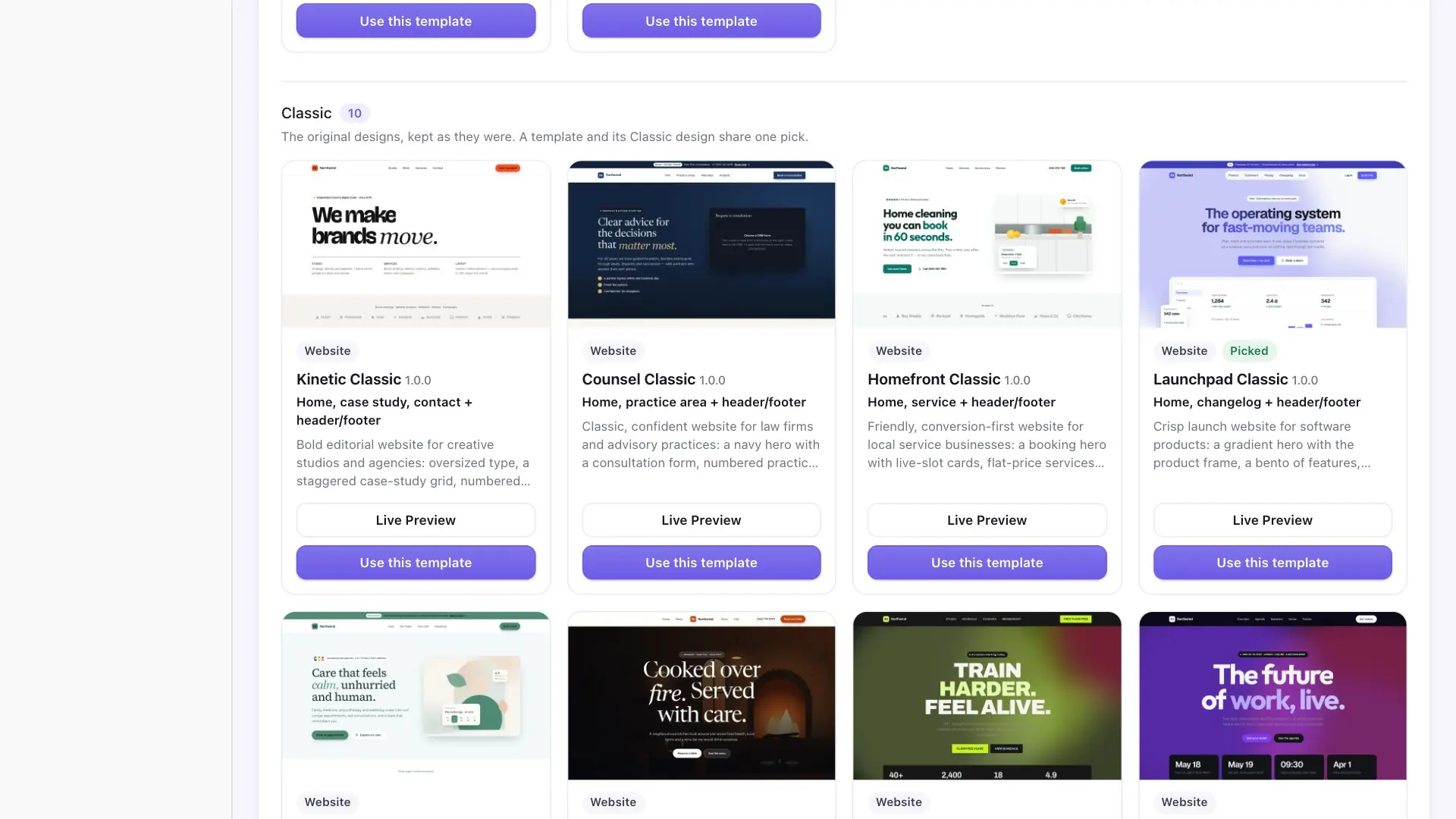
- Improved: the "Classic" cards show the Classic label in your language, and the template counter counts the current templates.
Websites
- Improved: the booking bar that stays at the bottom of the screen has a round button and a visible edge on dark websites, and
  takes the site's own colours on transparent sections.
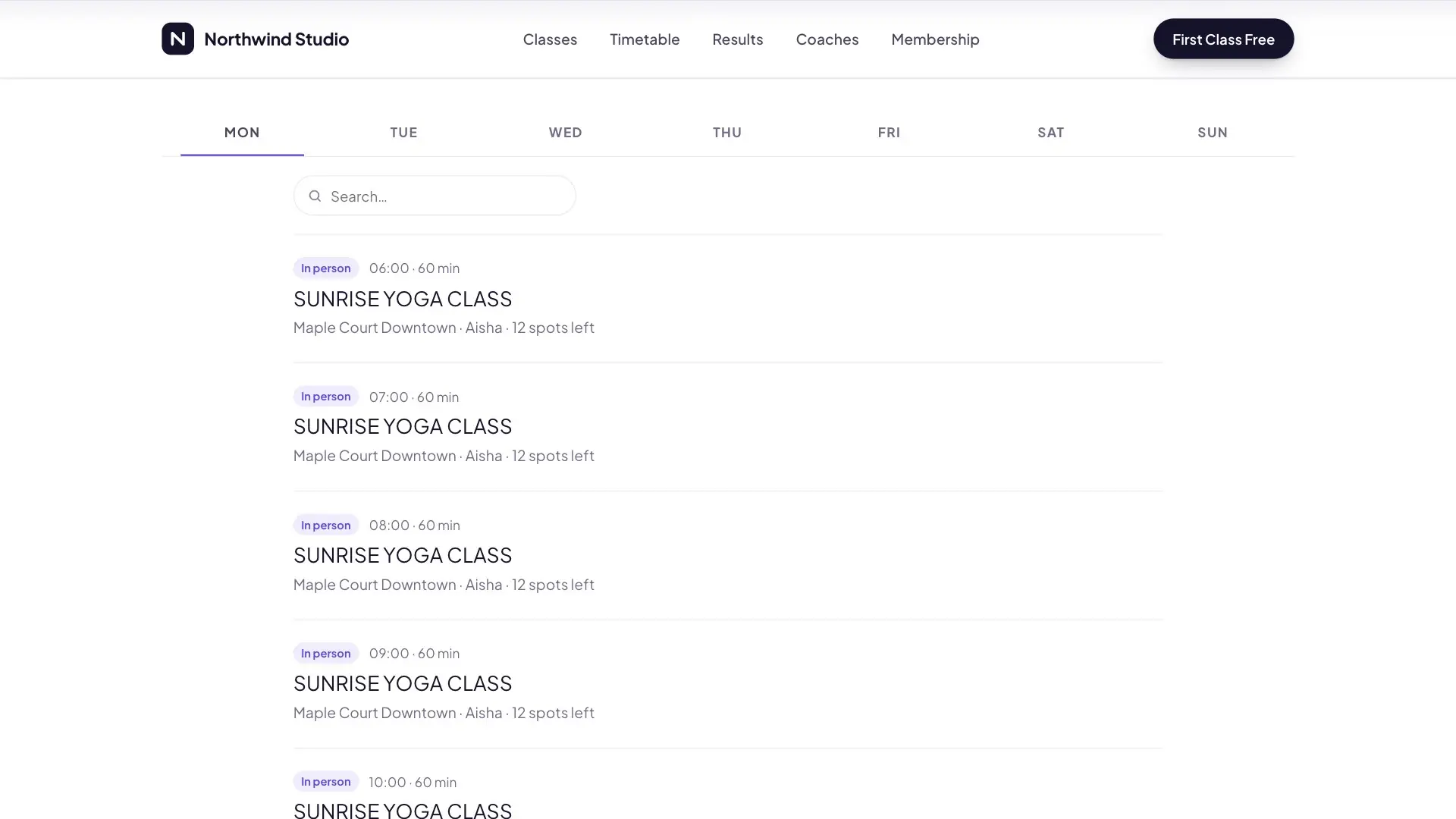
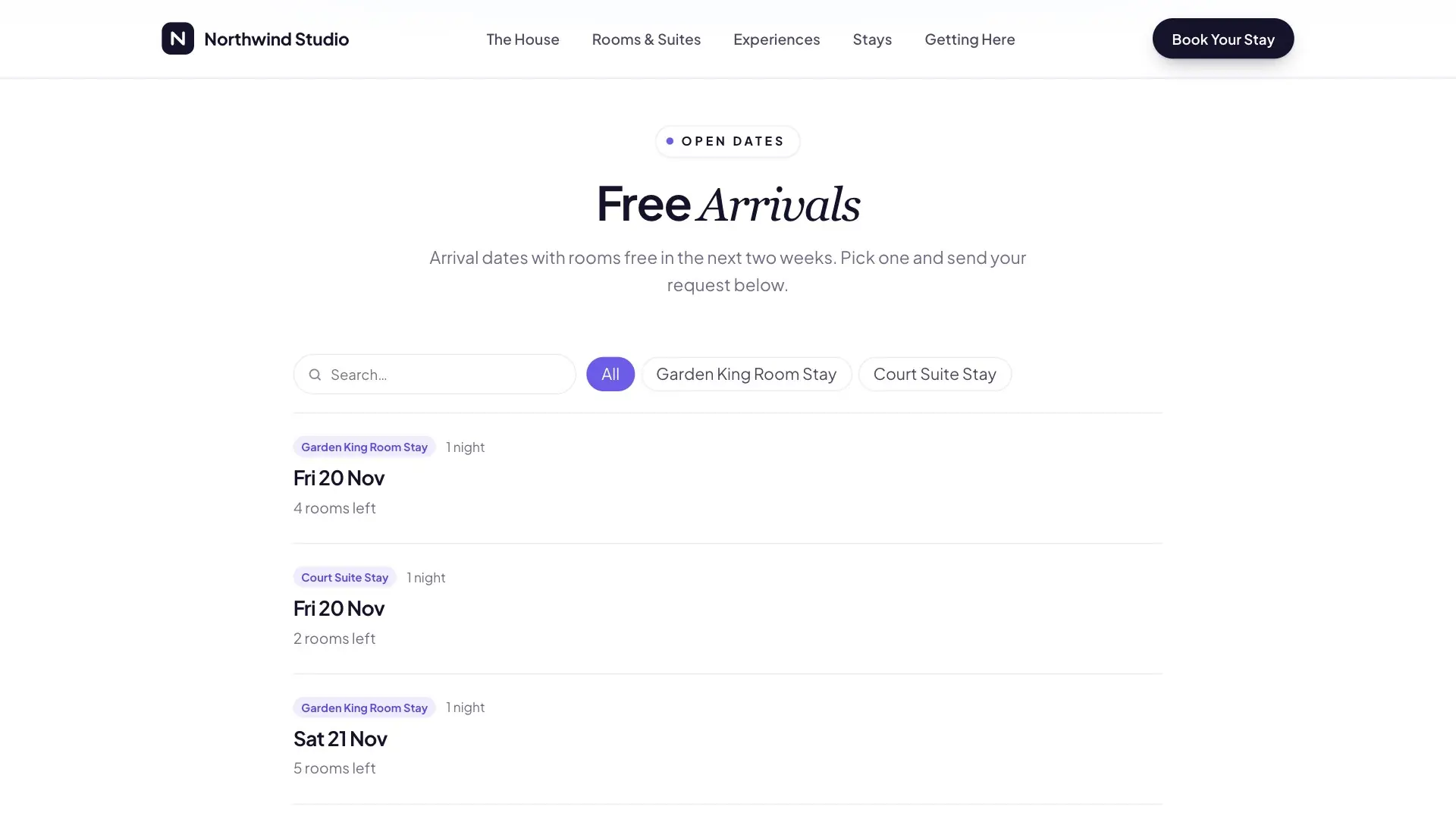
- Improved: the Ember, Serene, Homefront and Voyage templates show live times from Bookings 1.6.2 or newer (restaurant tables,
  appointments, room stays with nights and rooms left); with older Bookings they keep their labelled examples.
- Fixed: a long slide text in the full-picture hero slider no longer runs over the slider's name in the top corner.
Updates
- Upload the files and run Perfex's Upgrade Database for the module: no manual step, every design, page and setting is kept
2.2.5 - 2026-11-19 — Premium templates, redesigned
Premium Gallery
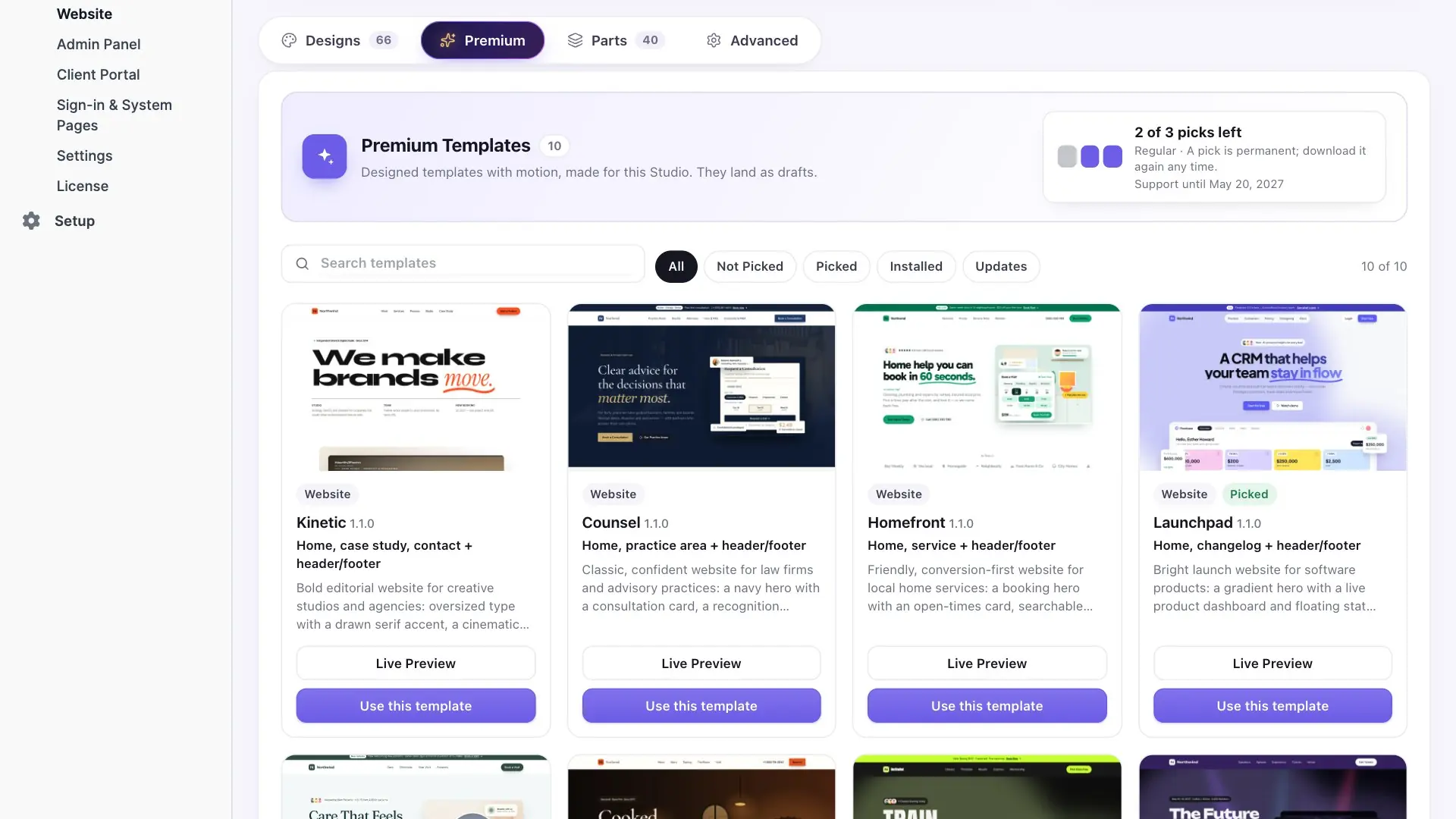
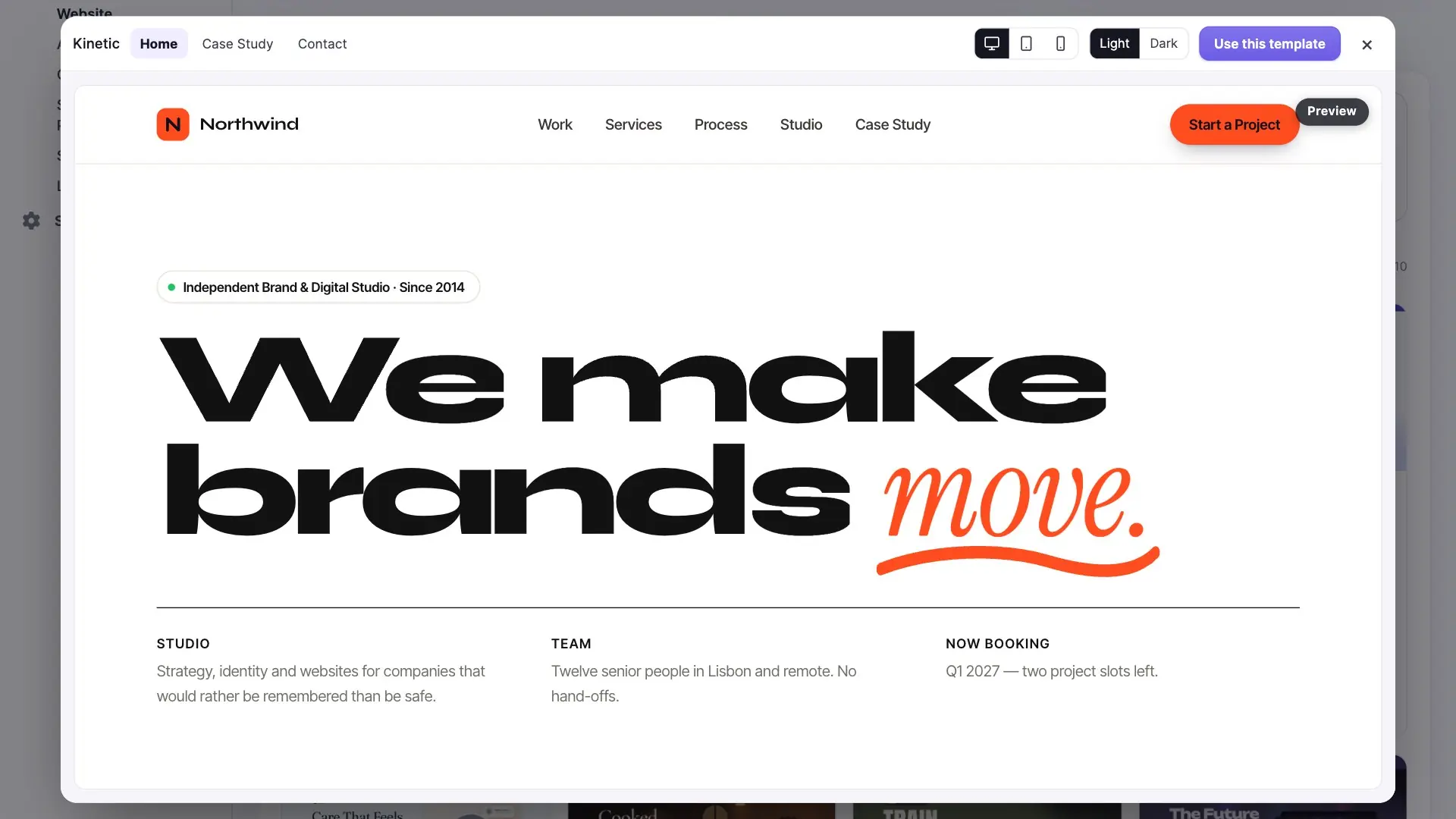
- New: all 10 premium website templates are redesigned — Launchpad, Kinetic, Counsel, Homefront, Serene, Ember, Pulse, Summit,
  Voyage and Atelier — each with its own industry look, sliders and richer motion.
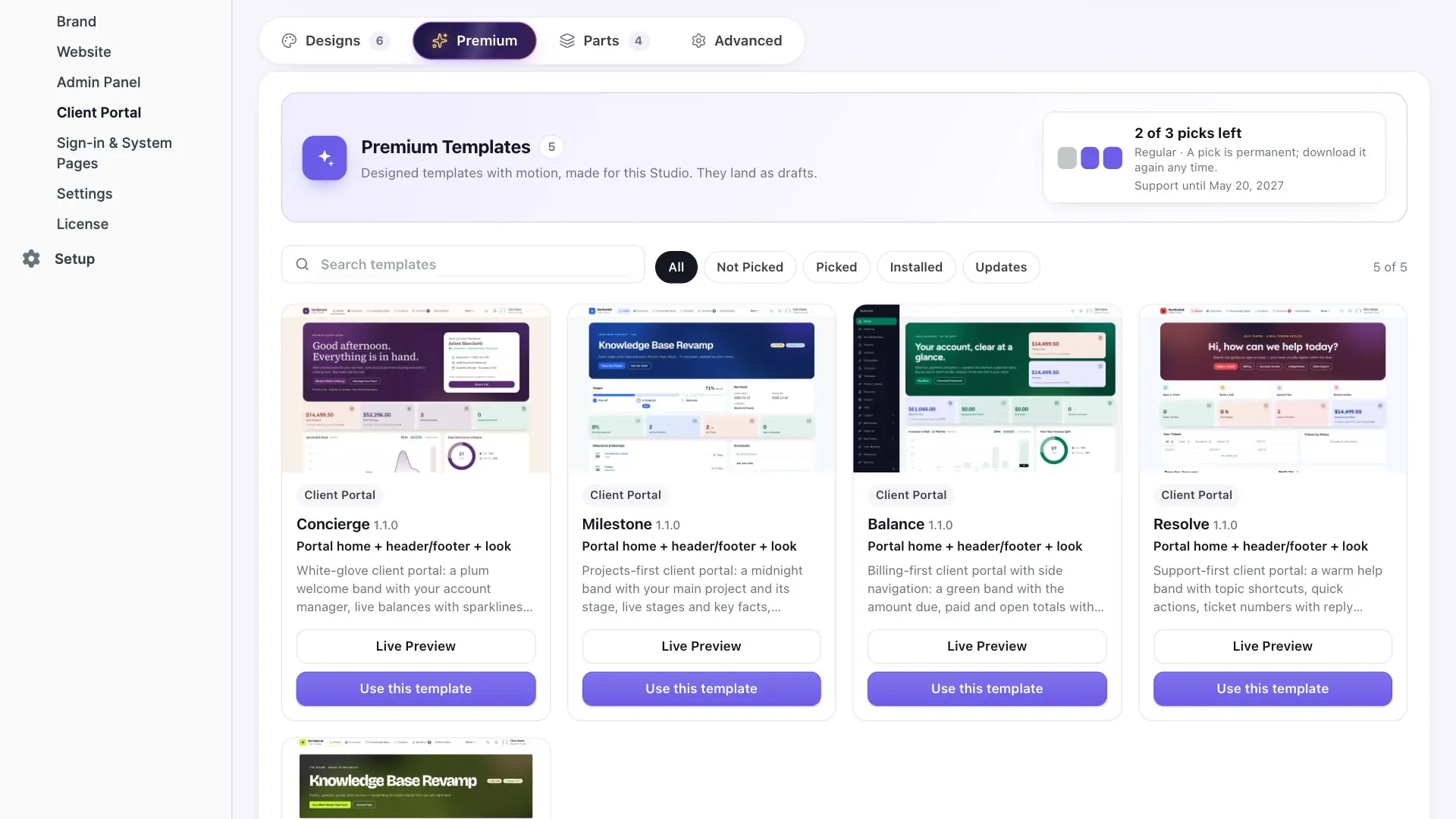
- New: the 5 premium Client Portal templates are redesigned as well.
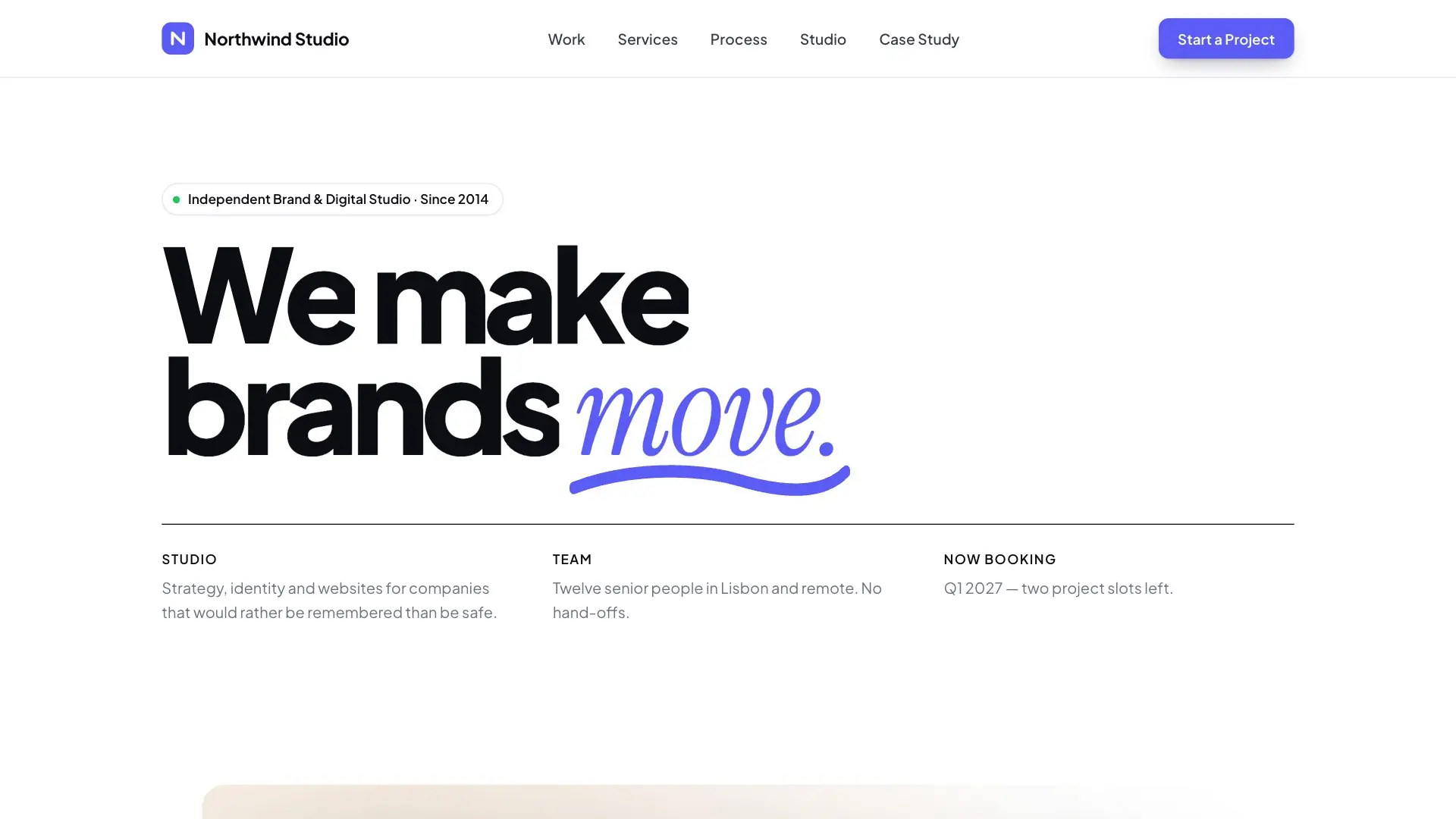
- New: the original designs stay in the Premium tab as "Classic" (for example Kinetic Classic), next to the redesigns; a
  template and its Classic design share one pick.
- Improved: Premium Gallery and the AI site kit picker have a search box and filters.
Websites
- New: searchable lists with filter chips, before/after pictures, tabs that move on by themselves, prices that flip when
  switching monthly / yearly, numbers that roll, a progress line through steps, words that light up as you scroll, a booking
  button that stays at the bottom of the screen, live-ticking hero cards and a "View" cursor over project cards.
- New: title words can carry a hand-drawn underline, a marker or outlined letters (text toolbar).
- New: Tabs can show as a full-width bar.
- New: the product hero can show four stat cards.
- New: lists can show live times from the Bookings module (next free times, today's classes, open stay dates), with times and
  day names in the location's own time zone and a service-type choice (appointments, restaurant tables, stays); the saved rows
  show as labelled examples when Bookings is not installed or cannot tell which type a time is, and pages with a live list
  are never stored in or served from the page cache.
- New: twelve more bundled font families for the premium templates (SIL Open Font License, listed in licenses/).
- Fixed: a picture with the wipe effect could stay empty on the published website.
- Fixed: a long empty space could stay under a short tab (Premium) after a long one.
- Fixed: the Live Preview toolbar keeps every label whole at every window size (on small screens the page tabs get a row
  of their own).
- Fixed: drop-down arrows in the Studio's compact fields keep their room from the text.
Client Portal
- New: list blocks can show contracts (with Sign) and files (with Download), with tabs and search.
- New: the activity feed can show a search box and type filters.
2.2.4 - 2026-11-14 — Premium downloads and your support period
Premium Gallery
- New: Premium template downloads need an active support period. The Premium tab shows "Support until …" (or "Support ended …")
  next to your picks.
- New: when support has ended, templates you have not picked yet show "Renew Support" with a link to renew; templates you
  already picked can still be downloaded again at the version you have, and a newer version shows "Renew Support to Update".
- Improved: a clear message with a renew link instead of "try again later" when a download needs support.
Websites
- Fixed: in some premium designs part of the main heading did not show on the published website.
2.2.3 - 2026-11-14 — Clearer translations
Translations
- Clearer wording in all 8 languages: the AI page assistant no longer shows English sentences, system-page template descriptions name the illustration and colours they really use, status badges read as states, and proposals are no longer called estimates.
- "AI Staff" is named without the "Perfex" prefix.
Security
- Request guard updated to kit 3.2.
2.2.2 - 2026-11-14 — Security update
Security
- Security: licence actions refuse forged cross-site and gateways/-tagged requests
- Security: the rate limiter for website forms and the command palette, and the kit temporary folder, now use a private
  folder inside the CRM (never the server's shared temporary folder) and never follow links
Accessibility
- Improved: Halo's rotating client quotes pause while you use the keyboard on the sign-in page, and a tap on them pauses
  or resumes them (as hovering with the mouse already did)
Updates
- Upload the files and run Perfex's Upgrade Database for the module: no manual step, every design, page and setting is kept
2.2.1 - 2026-11-13 — Halo, a premium sign-in style
Premium Gallery
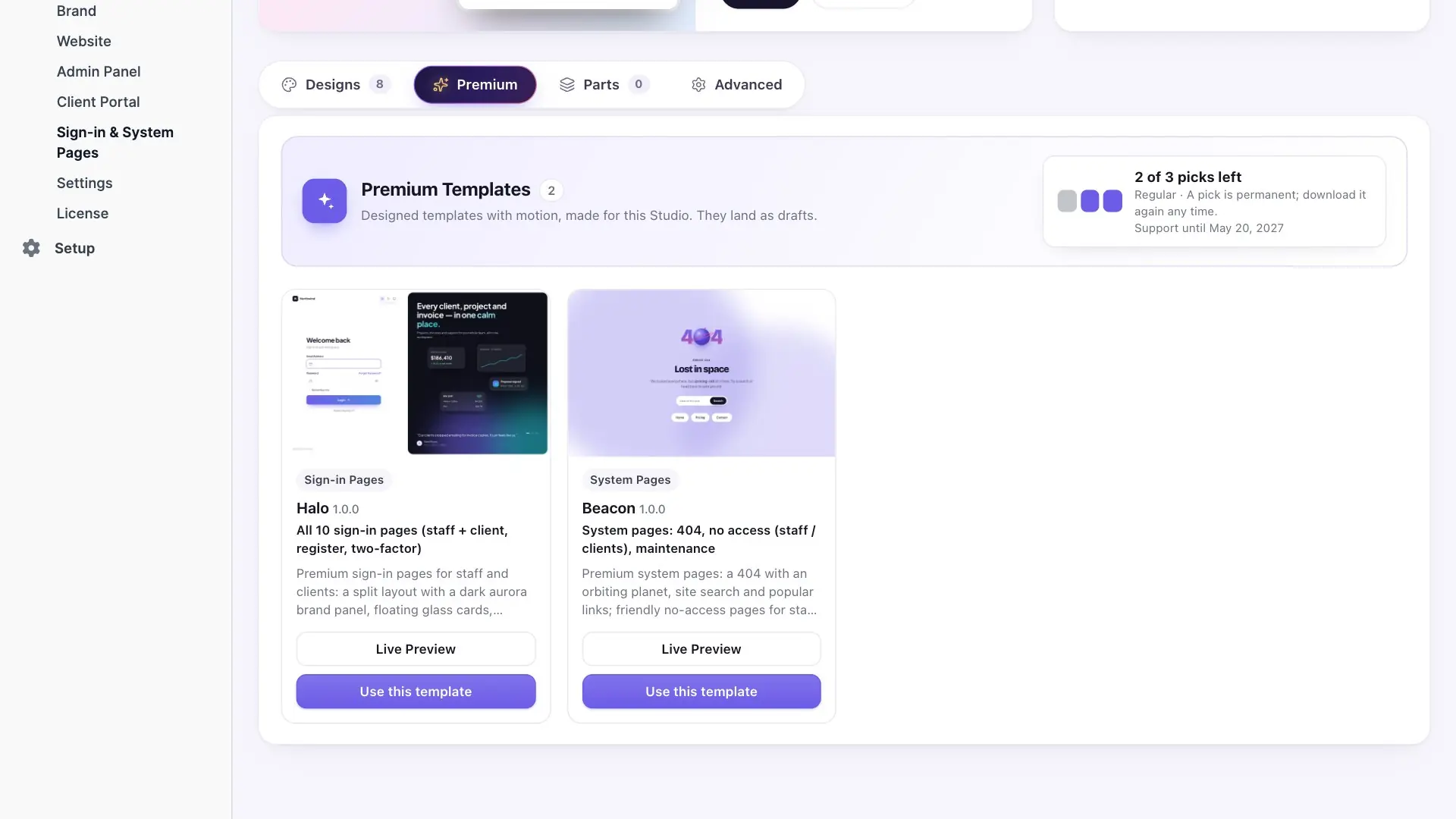
- New: Halo, a premium sign-in style for all your sign-in pages (staff and client sign-in, registration, two-factor code,
  password pages): a dark brand panel with soft moving light, your product picture floating, rotating client quotes, and a
  gradient sign-in button in your brand colour; readable on light and dark brand colours
- New: Sign-in & System Pages has its own Premium tab, like Website, Client Portal and Admin Panel: premium sign-in
  styles (Halo) and premium system pages (Beacon) from the Premium Gallery, imported as drafts; the system page editor's
  Premium templates show the system-page sets
- New: with a premium style, put *stars* around words in the side panel headline to highlight them
- New: Sign-in Pages shows the style in use ("Style: Halo (premium)") with Remove style to go back to your own look
- Motion plays like the other premium designs; with "Respect reduced motion" on, visitors who ask their device for less
  motion see it still
Other
- Fixed: Build with AI › Build For now shows which of Website, Client Portal and Admin Panel is chosen, with its note
  under the choice
Updates
- Upload the files and run Perfex's Upgrade Database for the module: no manual step, every design, page and setting is kept
2.2.0 - 2026-11-13 — AI builds your website, portal and admin pages; sliders
Build with AI (needs Perfex AI Staff 1.2 or later)
- New: Website › Designs › Build with AI — describe your business (name, industry, services, who it is for, tone and the
  pages you want) and AI Staff plans the site: the pages and the sections of each page
- New: review the plan before anything is built: rename pages, remove or reorder pages and sections, and see the estimated
  AI cost first
- New: one click builds the pages one by one, with progress and the real cost as it goes; every page is saved as a draft,
  never published, so nothing changes on your live website until you publish it yourself
- New: the build respects your AI budget in AI Staff: it stops before going over and you can resume it later; the pages
  already built stay
- New: Refine with AI on any section in the editor ("shorter", "two columns", "add pricing") — the section is replaced in
  place and Ctrl+Z brings the old one back
- New: wording suggestions for headlines, texts and buttons, written from your description and, when you keep them in AI
  Staff › Knowledge, your company facts
- New: stock photo suggestions for image blocks (free photos, credited); a picked photo is saved in your media library
Start from a Premium pack
- New: in the plan step, choose one of the Premium Gallery's website packs that fits your business; AI fills the pack's
  pages with your own words and facts, keeping its design, motion and pictures
- New: the pick counts like any Premium pick (Regular licence: 3 packs for good, Extended: all); you see what it costs in
  picks before you build, and a pack you already own is free to use again
- New: after a build from the editor's own blocks, a short "Make it look premium" suggestion shows up to three packs for
  your industry
Portal and admin pages
- New: Build with AI also makes your client portal home and your admin dashboard and record pages (customer, lead,
  task, invoice) from the same description; each page follows the rules of where it lives (portal pages show only what
  a contact may see, figures and insights only for staff)
- New: you choose the surface in the plan step; every page lands as a draft
Brand look from a description
- New: Brand Kit › Suggest a look (also in the plan step): one to three looks — colours, font pair, corners and spacing —
  made for your industry and tone, each checked for readable contrast in light and dark
- New: nothing changes until you accept a look; accepting writes drafts (Brand Kit, website look, optionally a new admin
  theme) and you can undo it for 24 hours
AI for custom HTML
- New: "Write with AI" on the Custom HTML block (administrators): describe the change, see the proposal next to your
  current HTML with the differences marked, and apply it only when you agree
- Safe by design: the proposal goes through the same cleaning as HTML you type yourself — no scripts, frames, event
  handlers or javascript: links ever reach the page, and what was removed is listed
AI pictures
- New: a Generate option next to the stock photos, for when your AI Staff can make pictures: two to four pictures from a
  short prompt written for the block, the cost shown first, kept private until you pick one, which then goes to your
  media library. It stays hidden while AI Staff has no picture generation
Sliders
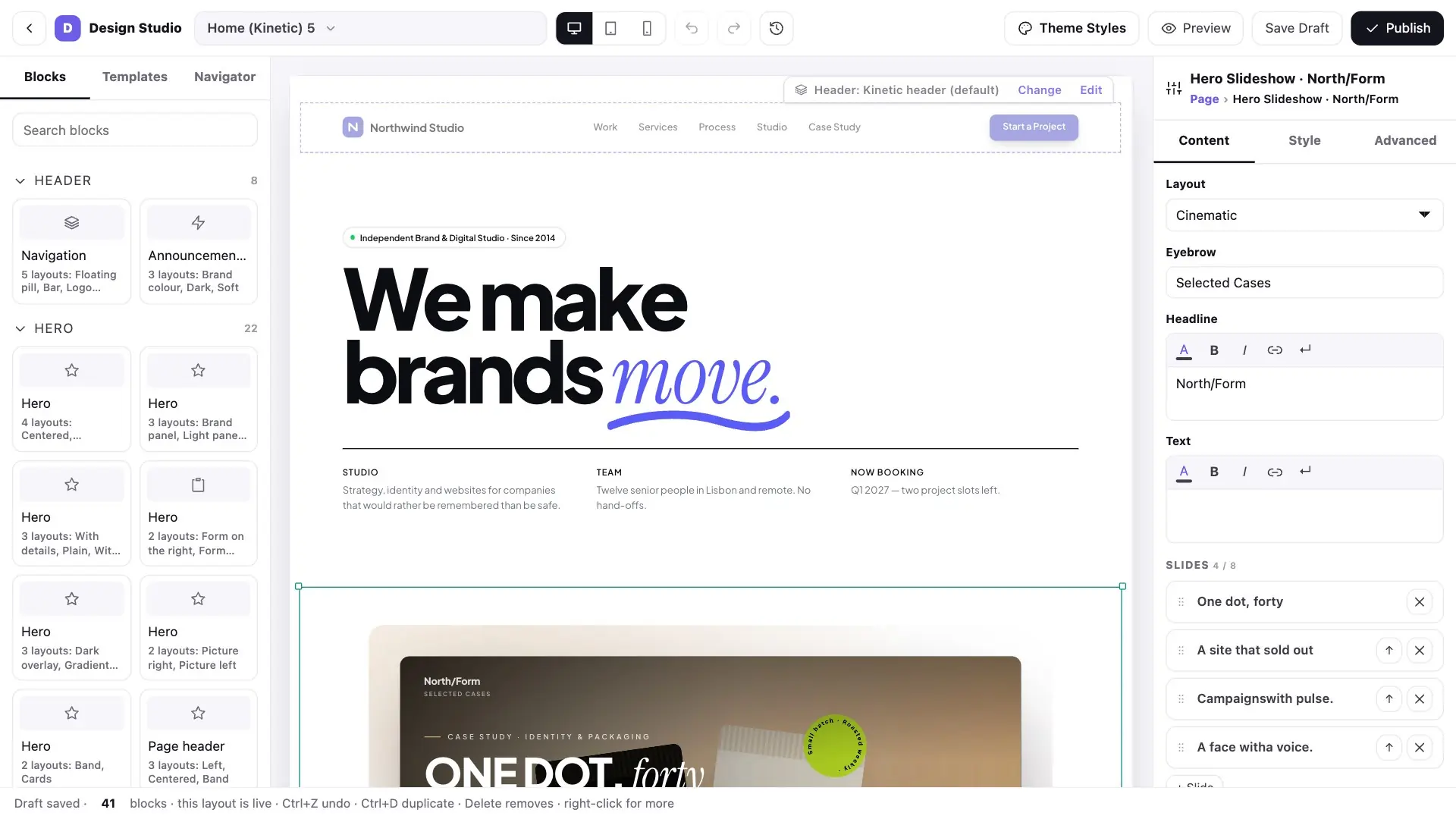
- New: three slider blocks for website pages — Hero Slideshow (Cinematic, Editorial, Duo, Float, Deck), Testimonial
  Carousel (Spotlight, Cards, Pages) and Gallery Carousel (Filmstrip, Cover Flow, Thumbnails)
- Arrows, dots, swipe and drag, keyboard, pause on hover, loop and autoplay timing; every slide stays in the page for
  search engines; visitors who asked their device for less motion get still slides when "Respect reduced motion" is on
Kits and Premium Gallery
- New: System pages (404, access denied for staff and for clients, maintenance) travel in kits and Premium packs; an import
  lands as a draft and never switches "Use these pages" or maintenance on
Other
- Improved: Bookings pages follow your theme's colours, surfaces and fonts more closely (the Bookings 1.3 tokens are
  mapped)
- Fixed: figures from other modules (for example Brain Pro's) picked for a dashboard KPI or chart are kept when you save
- Improved: blocks from other modules show a proper choice list (services, locations …) in the inspector
- Safe by design: the AI only uses the blocks of each editor, adds no code, scripts or outside links or pictures, and
  every page goes through the same checks as a page you build by hand; what you type and your company facts are treated
  as information, never as instructions
- Without AI Staff, or with AI Staff switched off for Design Studio, the AI buttons explain what is needed and everything
  else works as before
Updates
- Upload the files and run Perfex's Upgrade Database for the module (it also works while the module is inactive): no
  manual step, every design, page and setting is kept
2.1.1 - 2026-11-13 — Motion in the premium designs
Premium Gallery
- Fixed: motion in the premium designs (headline words, marquee, wipe, tilt, counters, aurora …) plays on the published
  website, as in the live preview; visitors who asked their device for less motion still see it calm when "Respect reduced
  motion" is on
2.1.0 - 2026-11-12 — Premium Gallery, motion, countdown
Premium Gallery
- New: a Premium tab on Website, Client Portal, Admin Panel and in the editor's Templates panel: designed template packs
  with motion, made for this Studio, with a live preview (Desktop / Tablet / Phone, light and dark) before you pick one
- New: a pack lands as drafts through the usual kit import; nothing goes live until you publish it, and the import can be
  undone in one click
- New: after an import, every item says where it lives (Website › Designs, Client Portal › Parts …) with an Edit link
  straight into its editor
Motion
- New: a Motion group in the editor (Advanced): entrance, hover, count-up for numbers, stagger and parallax for containers,
  with a Play button to try it on the canvas
- New: Settings › "Respect reduced motion": visitors who asked their device for less motion see the pages still
Countdown
- New: a Countdown block for launches and offers (target date, labels, what happens when it ends)
Website builder
- New: blocks from other modules show their own icon and description in the block list and get a proper inspector
  (choices instead of plain fields); first one: the Booking Form from Bookings
- Improved: buttons across the Studio got a subtle lift and sweep on hover (off when the device asks for reduced motion)
Other
- Improved: editor wording says "CRM" instead of the product name where it talks about the CRM's own layout
2.0.3 - 2026-11-12 — Website blocks from other modules, clearer money figures in Insight
Website builder
- New: other SellMyCode modules can add their own blocks to website pages (first one: the Booking Form from Bookings); they
  appear in the block list while their module is active, and a page keeps them safely when the module is switched off
  (visitors see nothing, the editor shows a note)
Insight
- Improved: money figures from other modules show what they are based on (for example "Base currency, whole months") and
  a note when records in other currencies were counted but not added in
2.0.2 - 2026-11-12 — Client portal polish
Client portal
- Fixed: Language in the account menu is highlighted across the whole menu row, its arrow with room at the end
- Fixed: the arrow in drop-down fields (Project, Department, Priority …) sits in the middle of the field
- Fixed: counts in the menu (Invoices, Support …) read clearly on every brand colour, light and dark
- Fixed: the editor's Preview always shows the portal's own look (or the look of the customer chosen in "Preview as"), never
  the colours of a customer group whose sign-in link was opened in the same browser
- Fixed: the Blank portal design shows its picture in Templates and in Designs
2.0.1 - 2026-11-12 — Client portal menus, sign-in fields, readable brand colours
Client portal
- Fixed: the header's "More" menu (when the menu items do not fit) is styled on every portal page and every header — the
  ready-made portal designs and the classic header; an item hidden in Menu Items no longer leaves an empty "More" list,
  and links that show only an icon get their name in the list
- Fixed: Language in the account menu opens on click, beside the menu (or inside it on phones), stays in the window and
  scrolls; languages show readable names ("Portuguese (Brazil)"), sorted; Escape or a click elsewhere closes it
- Fixed: portal menus open at once instead of fading in over a second
Sign-in pages
- Fixed: Email and Password fields with an icon keep room for it in every sign-in design (typed text no longer runs under
  the icon)
Brand and other modules
- New: a readable brand colour for text (--pds-brand-text) for the other SellMyCode modules: a pale Brand Kit primary no
  longer turns their links and buttons unreadable (they adopt it in their next update)
- Improved: link and soft-button colours aim a little above the 4.5:1 contrast minimum, so the Compatibility Check never
  reads them as borderline
- New: other SellMyCode modules can add their own numbers to Insight blocks on staff dashboards
- Improved: Compatibility Check "All" checks every installed module even with many pages (each module gets its share)
Other
- Fixed: with the module deactivated, its own addresses answer "page not found" instead of an error
2.0.0 - 2026-11-11 — Visual Editor, Website Builder, Templates & Kits
Navigation and editing
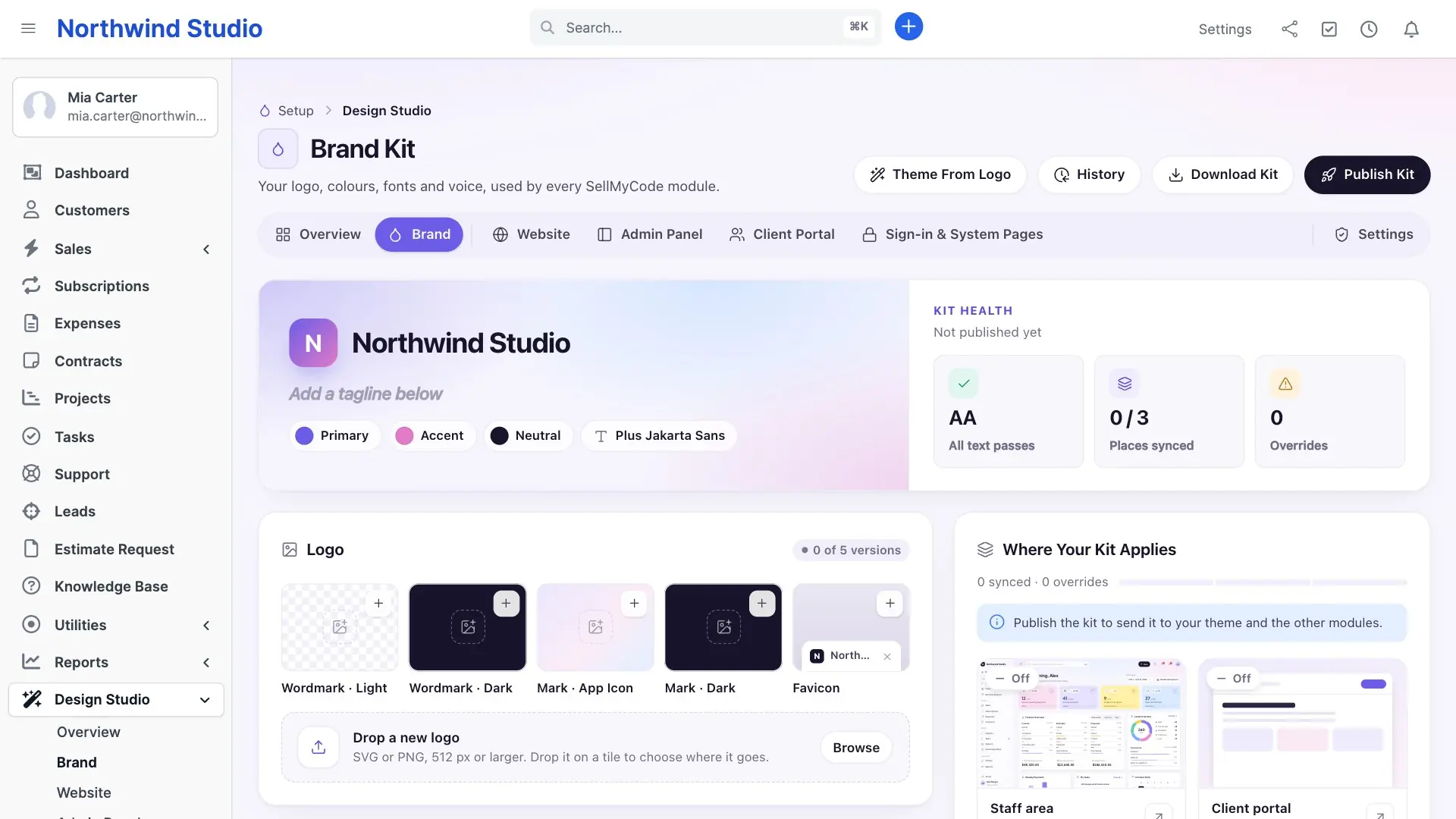
- New: Design Studio is organised by surface: seven tabs (Overview, Brand, Website, Admin Panel, Client Portal, Sign-in
  & System Pages, Settings), each surface with Status, Designs, Parts and Advanced; bookmarks to the old tabs redirect
- New: Typography and Border controls: font (Brand Kit fonts only), colour, size, weight, alignment, line height, letter
  spacing, case and decoration; borders by width, style, colour and side; per screen size
- New: Preview shows the draft, even unsaved, as the real page before you publish (a signed link valid for 10 minutes)
- New: staff who may only view get a read-only editor (they can look and preview; nothing can be saved)
- New: text in rich fields can take a Brand Kit text colour or a colour of your own
- New: bulk delete of website pages and library headers and footers (Select, then Delete): live ones ask first; the home
  page, default parts and parts in use are skipped with the reason. Deleted pages are gone for good, history included
Client portal
- New: Client Room blocks for the portal home: Needs your attention, Documents (with an upload or ask action when
  empty), Project progress and Coming up, and a hero status line
- A published portal home replaces Perfex's client home; "Also show the default client home below this layout" (Page
  settings › Advanced) keeps both
Brand Kit
- New: dark-mode logos: add, replace or remove a light-coloured wordmark and mark for dark backgrounds; until you add
  one, dark mode shows your logo on a light plate
Website Builder in the visual editor
- New: your public website pages open in the visual editor. Hero, features, pricing, testimonials, logos, stats, FAQ,
  gallery, team, call to action, map, footer columns and lead form blocks, mixed with headings, text, buttons, images,
  columns and containers; every text, button and image is editable, with style and per-screen settings
- New: the industry templates are rebuilt as editable blocks; Use This Template creates draft pages, never published
- New: lead form block that sends to your Perfex web-to-lead form, so captcha, consent, assignment and notifications
  work as set in Perfex
- Existing pages keep their look after the update. A page moves to the editor the first time you change it there, with a
  backup (opening it changes nothing): Revision history keeps the page as it was ("Classic page, before the visual editor")
  and Restore brings it back; Back to the classic editor in Page settings returns it to the classic editor. Convert to
  blocks turns an older section into blocks
- New: header and footer library. Make as many headers and footers as you like (from the classic one, a starter, a copy
  or blank), pick one of each as the site default, and choose per page: the default, none (landing pages) or a specific
  one. Only published headers and footers show to visitors; the classic built-in ones stay available
- New: Navigation block for headers: links to your pages, anchors or any address (new tab optional) with one level of
  dropdown links, log-in and call-to-action buttons you can show or hide, the site logo or a logo of its own with a
  dark-mode version, sticky and transparent-over-the-hero options; five layouts including Split, logo centre. Older
  navigation bars turn into it with Convert to blocks and look exactly as before
- New: display conditions for headers and footers: all pages, chosen pages or an address pattern (for example pricing*
  or blog/**). The most specific rule wins; a preview shows which header each page gets and why
- New: unpack a block into elements: a hero, features, pricing, FAQ or any other website block becomes headings, text,
  buttons, images and grids you can move and style one by one, with all of its content. Live-data blocks (map, posts,
  booking button) stay one block; a lead form keeps its two columns once a Perfex form is chosen in it
- New: an image can link to a page or address (same or new tab), and any element can have an anchor name for links
  to that spot
- New: columns with any widths and a choice of where they stack (never, tablet, phone) and reversed order when stacked;
  backgrounds with your own colour, a picture (position, size, repeat, fixed) and a colour overlay
- Contact and quote request forms on your website get spam protection on top of Perfex's: a hidden trap field and a
  limit per visitor and per form, with a clear message when a visitor sends too many
- Titles, descriptions, social images, sitemap and clean addresses as before
System pages
- New: your own Page not found (404), No access (staff and clients, 403) and Maintenance pages, made in the visual
  editor with the website blocks; the 404 page has a search box for your website pages. Status codes stay right (404,
  403, 503) and scripts, the API and cron jobs keep Perfex's answers; Safe Mode turns them off
- Missing records inside Perfex pages show your 404 page; for addresses that match no page at all, one optional line in
  application/config/my_routes.php (shown with a Test button) sends those to it too
- New: maintenance mode with a 503 page and Retry-After; administrators, allowed staff and IP addresses or ranges get
  through, and a one-time bypass link lets the first browser that opens it in for 24 hours (making a new link ends the
  earlier passes); the admin sign-in page always opens
- New: a plain 500.html in your colours and logo for server errors, with the ErrorDocument line to copy and a Test
- Maintenance mode leaves payment gateway callbacks, the Perfex REST API and the mobile app API working; modules can add
  their own addresses
SaaS
- Tenants follow the main install's licence: when it is not active, Design Studio switches itself off in every tenant
  until it is active again
- Tenants are recognised only through SaaS Studio's signed tenant registry (or an active multi-tenant module), not by
  constants or functions alone
- Locked plan areas answer scripts with a clear "not in your plan" code, and the Get started checklist and status cards
  no longer link to pages the plan does not include; maintenance on a tenant applies only while its plan includes it
Insight dashboards
- New: Insight blocks for admin and portal dashboards: KPI cards with sparklines, area, line and bar charts with the
  previous period, donut and bubble shares, targets (your number or a Perfex goal), funnels and an activity feed
- One period picker per dashboard (this month, last month, last 30 days, this quarter, year to date, last 12 months or
  a custom range), in your CRM's time zone; each block can use its own period
- "Still to come" on revenue and payment charts: open invoices by due date. Amounts are in your base currency; invoices
  in other currencies are counted and noted, never mixed in
- Every number follows Perfex permissions; customers in the portal see only their own company, and support numbers
  follow your "contacts see only their own tickets" setting
Templates
- New: starter templates for record pages, dashboards, the portal home and the header and footer parts
Dashboards
- Dashboards and the client portal show a picture of each published layout in Design Studio
- New: Dashboard Widget block: place Perfex's own dashboard widgets (and those of your modules) anywhere in a designed
  dashboard; a widget whose module is removed simply drops out
Speed
- The editor opens with its first data in the page (no wait for separate requests), website card pictures are cached,
  and pictures, styles and scripts can be cached by the browser for a year after each update (Apache)
Design kits
- New: export a whole look as one kit file (website pages, portal, record pages, dashboards, theme parts, theme styles,
  saved templates and images) and import it on another Perfex: preview, choose parts, everything lands as drafts,
  nothing goes live until you publish, and one click undoes the import (anything you published or edited since stays)
- Kits contain data only: strict checks refuse code, unsafe links and oversized files with a clear reason; a picture
  too large for your server's memory is refused by name instead of failing
- On plans without Templates and packs the Kits page is hidden (an earlier import can still be undone there); exporting
  and importing a single theme file stays available on every plan in Settings › Theme File
- Kits carry your header and footer library (which one is the default) and display conditions; imported headers and
  footers arrive as drafts and never replace your current default
Page editor
- New: layouts for the customer, lead, task and invoice pages, per-role dashboards, the customer portal home and sign-in
  pages, and the admin and portal header, sidebar and footer. Each has a draft, Publish, revision history, Restore
  (into the draft) and Back to Perfex Layout.
- New: data blocks: record and custom fields with a format and an empty text, KPIs, charts, related invoices, estimates,
  tasks, tickets and projects with filter, sort and paging, activity timeline, address, progress and status.
- New: display conditions (status, amounts, viewer role or permission, empty field; AND/OR), checked on the server.
- Every data block is resolved on the server for the person viewing it, with Perfex's own permissions: a value they may
  not see is never sent, and hidden blocks are not in the page. Contacts only see their own company's data.
- New: when Perfex moves or removes a panel or hook after an update, that block falls back to Perfex's own layout and
  the editor warns you; nothing is lost. Panels from other modules arrive as module blocks.
- New: AI layout drafts with AI Staff (shown only when AI Staff is installed). Drafts are checked against the block
  list, fields and permissions, and are never published by AI.
- New: Custom HTML block for administrators, cleaned on save: no scripts, event handlers, iframes, forms or remote
  styles.
- New: templates for a block, a section or a page, with import and export as .pds files; the free packs can carry
  templates and layouts, installed as drafts.
- New SaaS Studio plan features: Page editor, AI layout, Templates and packs.
- Safe Mode turns everything off, including the new header, sidebar and footer.
- Upload the new files and run Perfex's Upgrade Database for the module, active or not: no manual step. Themes, menus,
  per-role dashboards and login pages keep working as they are; nothing is converted until an administrator opens the
  editor.
1.6.4 - 2026-11-06 — Website texts keep every word
- Fixed: on servers with an older libxml (for example Ubuntu 22.04), website page text lost the words after a "
1.6.3 - 2026-11-06 — Website editors in the sidebar
- Fixed: staff with only an area right and no Design Studio View right now see Design Studio in the sidebar, with
  just the pages they may open under it: Website (Website: View), Portal branding (Portal: View), Saved views
  (Views: Manage) and Settings / Modules (Settings). Before, they could open those pages but had no menu item.
- Upload the new files and run Perfex's Upgrade Database for the module, active or not: no manual step, every
  setting and record is kept
1.6.2 - 2026-11-06 — Sidebar menu fix
- Fixed: the sidebar menu shows the module's pages again; it showed only License.
- Improved: the License page says updates are included with your licence; there is no renew prompt.
- Upload the new files and run Perfex's Upgrade Database for the module, active or not: no manual step, every
  setting and record is kept
1.6.1 - 2026-11-05 — To-do spacing, portal colours for apps
- Fixed: the "No todos found" line on the To-do list sat against the card edge; it has proper spacing again.
- Your customer portal brand colours can now be read by customer apps connected to your CRM, so they match your portal.
- Updating: upload the module ZIP in Setup > Modules as usual; settings and themes are kept. One-click updates come
  with the next minor release; this patch keeps the current licence system.
1.6.0 - 2026-11-01 — Works with your other modules
Modules page (Studio › Modules)
- Every installed module in one list, grouped as other vendors, SellMyCode and included with Perfex, with the result of
  its last check
- A look per module: Full Theme (the default), Frame Only (the theme on the menu and header, the module's own pages
  unchanged) or Original Look (no styling on that module's pages); saved at once with Undo, and a preview of each look
  on the module's own page for you only
- Perfex's own pages and the Studio always keep the theme; safe mode and the other ways back still switch everything off
Dark mode on other vendors' modules
- A safety net for their pages in dark mode: white boxes and near-black text written into a module's pages take the
  theme's colours, and text that is too faint to read is made readable (WCAG AA contrast); status labels, pictures,
  charts, signatures and document previews are left alone; nothing changes in light mode
- On by default; one switch turns it off
Compatibility Check
- Opens every page of the staff menu (or only the pages you choose: other vendors' modules, SellMyCode modules,
  Perfex's own pages or one module) in light and dark, one page at a time in your own browser, and lists hard-to-read
  text, light boxes left in dark mode and pages that scroll sideways, with a small snapshot of each page
- One click sets a module to Frame Only or Original Look from a result; Cancel keeps what was checked; links that would
  change data or sign you out are never opened; results stay on your site; administrators only
SellMyCode modules
- Books, People, Product Hub, Inbox, TeamPulse, Client Hub, Document Studio, Flow Studio, Connect, Sales Growth, SaaS
  Studio and Bookings now follow your theme's colours, fonts, corners and light/dark like Brain Pro, AI Staff,
  Sentinel, Deliverables and Cash & Capacity; one light/dark switch (the header's) for all of them
Fixed (found by the Compatibility Check)
- With many module icons in the header, the page no longer scrolls sideways on laptop screens (the search box gives way)
- Green, red and amber buttons keep their white text readable in every preset, light and dark
- Calendar day names and day numbers follow the theme (they stayed dark grey in dark mode)
- Charts drawn by other modules: export buttons, menus, tooltips, legends and labels follow the theme in dark mode
- Success, warning and danger text, chips and notices of SellMyCode modules use the theme's readable status colours
For module authors
- The theme's colour tokens and page classes are documented (Documentation › Other modules › For module authors), so
  other modules can follow any theme in light and dark
Updates
- Upload the new files and run Perfex's Upgrade Database for the module: one new table for check results; every
  setting and theme is kept, and every module keeps the full theme until you choose otherwise


 0 Viewing now
Live buyer activity

Pick 3 of SamSan’s items to unlock 10% off your total.
Everything you pick is added to your cart when you tap the button below.

This item was featured on SellMyCode
Last update:
20 Nov, 2026
Published:
09 Oct, 2026
Version:
Category:
Framework:
Tags:







 Google
 Github
 From Unknown Location
 Elite Seller
 Trend Master